
Do This Now
- 1 Run heavy distortion in parallel on a Dirt Bus. Inserting it on the source track destroys transients and wrecks multi-mic phase.
- 2 Filter that bus at 500Hz high-pass and 5kHz low-pass so it adds midrange density and nothing else.
- 3 Reach for tube or tape when you want even harmonics and weight, transistor when you want odd harmonics and cut.
- 4 Set tape to 15 IPS for a tighter low end, 30 IPS for extended high frequencies.
- 5 Shave a snare transient with a clipper rather than a limiter, and keep clippers off sustained material entirely.
Playing connects you to YouTube, which may set cookies.
Adding distortion to a mix is not just about making things loud. It is about harmonic generation, peak management, and sitting tracks in a dense arrangement. A raw digital recording is sterile. It lacks the natural compression and subtle harmonic excitement of analog gear. Saturation bridges that gap.
This guide details the technical realities of saturation topologies. You will learn how to route parallel distortion, manage phase issues, and select the correct harmonic profile for specific mix problems.
The Physics of Harmonic Generation
Every distortion circuit generates additional frequencies based on the fundamental pitch. These are harmonics. The character of the distortion depends entirely on whether these harmonics are even or odd multiples of the fundamental. Even harmonics relate to musical intervals like octaves and fifths. Odd harmonics introduce dissonant intervals.
Tube distortion primarily generates even harmonics. When you drive a pentode or triode circuit hard, the wave rounds off smoothly. This thickens the low-midrange and reduces perceived harshness. Tape saturation behaves similarly but introduces high-frequency roll-off due to the physical limitations of magnetic tape.
Solid-state gear generates more odd harmonics. Transistor-based preamps clip aggressively when pushed. This creates bite and presence in the upper frequencies. Odd harmonics are aggressive and cut through the mix easily.
Digital clipping is the harshest form of distortion. It truncates the waveform instantly at 0dBFS. This produces a massive spread of high-order odd harmonics. It sounds brittle and fatiguing in large doses, but it is useful for shaving off micro-transients on snare drums.
Real-World Topologies: Tube vs Tape vs Transistor
Tube saturation warms up a sterile vocal take. Insert a tube emulator on the vocal channel and drive the input stage until the gain reduction meter barely twitches. This adds weight to a thin vocal. The friction point here is the noise floor. Many tube emulations model the hardware hiss, forcing you to use automated gating.
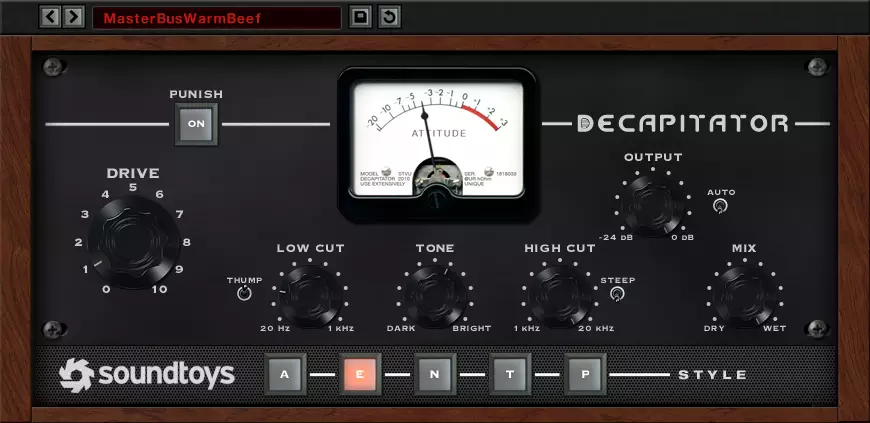
Tape emulation is superior for gluing the drum bus. Set the tape speed to 15 IPS for a tighter low end, or 30 IPS for extended high frequencies. The compression curve of tape rounds off harsh cymbals naturally. The major annoyance with tape plugins is the CPU load when oversampling is engaged.
Transistor distortion excels on bass guitars and kick drums. The odd harmonics give the instrument enough midrange cut to be audible on small speakers. Send the bass DI to an auxiliary track. Insert a transistor distortion unit and drive it hard, then blend it back under the clean signal at -15dB.
Actionable Strategy: Parallel Distortion Busses
Do not insert heavy distortion directly on your primary tracks. It destroys transients and ruins the phase relationship of multi-mic setups. The correct method is parallel processing.
Create an auxiliary track and name it "Dirt Bus". Send your bass, snare drum, and lead vocal to this bus at varying levels. Insert an aggressive distortion plugin like a Pro Co Rat emulation or a digital bitcrusher here. Follow the distortion with a high-pass filter set to 500Hz. Follow that with a low-pass filter at 5kHz.
Blend this Dirt Bus behind your main mix. The distorted signal adds midrange density and perceived loudness without affecting the sub-bass or the high-frequency air. The high-pass filter prevents the low end from getting muddy. The low-pass filter stops the high-end fizz.
- High pass
- 500Hz
- Low pass
- 5kHz
- Feed it
- Bass, snare, lead vocal
- Then check
- Phase against the clean track
A common mistake with parallel distortion is ignoring the phase correlation. Hardware emulations often introduce microscopic latency. Check the phase relationship between the clean track and the parallel track. If the low end disappears, flip the phase on the auxiliary track.
Multi-Band Saturation Techniques
Broadband distortion affects the entire frequency spectrum equally. This is a problem on a drum break because the kick drum will modulate the high frequencies, causing intermodulation distortion. The solution is multi-band saturation.
Use a dedicated multi-band distortion processor. Isolate the low frequencies below 150Hz. Apply subtle tape saturation to this band to add glue without destroying the punch. Isolate the midrange between 500Hz and 3kHz. Apply aggressive transistor distortion to this band to push it forward in the speakers.
Leave the high frequencies above 5kHz completely clean. This preserves the transient detail of the hi-hats and cymbals. The friction point with multi-band processors is phase smearing at the crossover points. Use linear phase crossovers if the plugin allows it, but be prepared for pre-ringing artifacts on percussive material.
- Below 150Hz
- Subtle tape saturation
- 500Hz to 3kHz
- Aggressive transistor
- Above 5kHz
- Leave clean
- Crossovers
- Linear phase, watch pre-ring
Shaving Transients with Digital Clipping
Digital clipping is a precision tool for loudness. A snare drum often has a micro-transient that peaks 6dB higher than the body of the drum. A limiter will pump and pull up the background bleed if you try to catch this peak. A clipper handles it instantly.
Insert a soft clipper on the snare bus. Set the ceiling to catch only the top 3dB of the transient. The clipper lops off the spike and generates harmonics that are masked by the snare hit itself. This allows you to push the entire mix louder into the master bus limiter.
Do not use clippers on sustained material like vocals or pianos. They will sound broken and crackly. Clippers belong strictly on fast, percussive transients. Monitor the output carefully, as extensive clipping will cause listening fatigue very quickly.
Related Articles
Best Distortion Plugins (2026): Industrial Design
Destroy your sound. We review the best creative distortion units (Trash, Thermal) for aggressive sound design and heavy basses.
The 7 Best Saturation Plugins For Analog Warmth (2026)
Seven saturation plugins compared for composers, from Decapitator, Saturn 2 and Softube Tape to Radiator, Oxford Inflator and Type A, by job, tone and control.
Frequently Asked Questions
Is saturation the same thing as distortion?
They are the same process at different intensities. Saturation is soft clipping that adds harmonics while leaving the waveform broadly intact; distortion is the same circuit driven far enough that the shape of the wave changes audibly. The label on the plugin tells you the intended amount, not a different mechanism.
Should saturation go before or after compression?
Before, in most cases. Saturating first rounds the peaks the compressor would otherwise grab, so the compressor works on a steadier signal and needs less gain reduction. Putting saturation last is a mastering move, used to glue a bus rather than to control it.
Why does my mix get quieter when I add tape saturation?
Tape emulations usually apply high-frequency loss and soft compression together, and the ear reads the missing top end as a drop in level. Match the plugin's output to its input and A/B at equal loudness before deciding whether it helped. Almost every saturation plugin sounds better simply because it is louder.
How much harmonic distortion is too much on an orchestral mix?
If you can hear the effect on a solo sustain, it is too much for orchestral material. Saturation on a virtual orchestra is there to add density and forward presence, not character, so it works best at settings you only notice when you bypass it.
More Guides
All Guides →A Producer's Guide to Tape Emulation and Saturation
How tape emulation works and how to use it: tape speed, bias, wow and flutter, harmonic saturation, and where tape belongs on tracks, buses and the mix.
Why Your Strings Sound Fake, and It Is Not the Library You Bought
Sampled strings give themselves away on note starts, not on tone. How to measure a legato patch's attack delay, set negative track delay per articulation, and stagger section entries.
What Is a Mod Wheel? MIDI CC1 and What It Actually Controls
The mod wheel sends MIDI CC1, but what that does depends entirely on what is receiving it. Vibrato on a synth, dynamics on a sample library, and how to fix one that does nothing.
New reviews, no noise
Occasional email when we publish something worth your time. No daily digest, no vendor press releases.
We store only your address, never sell it, and delete it as soon as you unsubscribe. See our privacy policy.

Henry Foster
Henry is a mixing engineer with a background in broadcast and post-production. He obsesses over signal flow, gain staging, and the subtle coloration of analog-modeled plugins. His reviews focus on technical precision, CPU efficiency, and UI workflow.