

Best Convolution Reverbs (2026): Real Spaces

Real spaces are hard to beat. When algorithmic tails just won't glue your orchestra together, these convolution engines bring the actual sound of legendary halls into your DAW.

Louis Raveton
By Louis Raveton Composer & Lead Editor at MODWHEEL

ModWheel is reader-supported. When you buy through links on this page we may earn an affiliate commission, at no extra cost to you. This never influences which products we recommend, read our testing methodology.

Prices come from the store's own feed and were last checked 8 September 2026. We don't issue discount codes — the price you see is the store's own.

Pick one in 10 seconds

Short version
  • You are gluing an orchestral template together The scoring stage IRs are the reason to buy it. Spaces II
  • You are matching foley or dialogue to a real room Altiverb 7
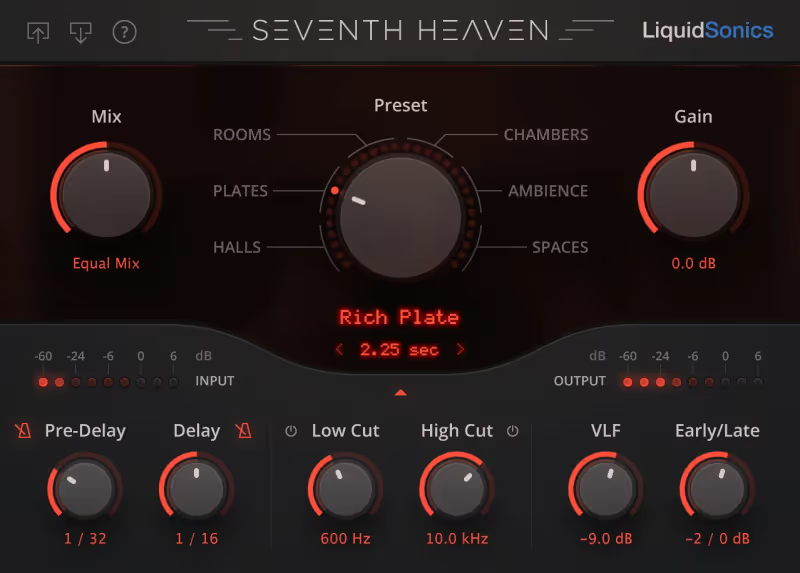
  • You want the Bricasti sound on a lead vocal Seventh Heaven
  • You need to sculpt the tail rather than place a room IR1 Convolution Reverb
  • You want one lightweight reverb inside a modular chain Convolver

Compare all 7

Spaces II
1. Spaces II EastWest Sounds
7.3
Engine
VST/AU/AAX
Type
True Stereo Convolution
Size
20 GB
$104 $199 View price
VerbSuite Classics 7.3
Engine
VST/AU/AAX
Type
Classic Hardware IRs
Size
10 GB
Engine
VST/AU/AAX
Type
Standard Convolution
Size
4 GB
$29 $129 View price
MConvolutionMB
4. MConvolutionMB MeldaProduction
7.5
Engine
VST/AU/AAX
Type
Creative Multiband
Size
500 MB
$27 $54 View price
Convolver
5. Convolver Kilohearts
7.2
Engine
VST/AU/AAX
Type
Snapin Convolution
Size
100 MB
6. Altiverb 7 Audio Ease
8.3
Engine
VST/AU/AAX
Type
Post-Production IRs
Size
7 GB
7. Seventh Heaven LiquidSonics
7.7
Engine
VST/AU/AAX
Type
Bricasti M7 IRs
Size
10 GB

Algorithmic reverbs are fantastic for lush, artificial tails, but when you need to place a dry sample into a specific concert hall, nothing beats convolution. By using Impulse Responses (IRs): sonic fingerprints of real rooms: convolution reverbs allow you to "record" your VSTs in the world's most famous studios and cathedrals.

For composers, the best convolution reverbs for realistic spaces are essential for blending dry close mics with wet orchestral libraries. Whether you are matching dialogue for post-production or creating a unified room sound for a disparate sample template, finding the right scoring verbs for kontakt and other engines is key to a professional mix.

Convolution buys realism and gives up flexibility, which is the wrong trade on a lead vocal where the reverb has to be shaped around the words. 7 Best Vocal Reverb Plugins for Professional Mixes covers the algorithmic side of that decision.

Top Picks

01 EastWest Sounds

Spaces II

Best for Orchestral Mixing

The fastest way to make sampled sections sound like they were recorded in the same room, provided you never need to reshape the tail.

Score
7.3
out of 10

How it scored

  • Sound Quality 9.2

    True stereo IRs of real scoring stages. Little else competes here.

  • Workflow Speed 8.0

    Zero-latency mode makes it usable while tracking.

  • CPU Footprint 6.5

    20 GB of IRs and not the lightest instance in a big template.

  • Metering & Control 5.5

    Envelope shaping is thin, and iLok is required.

Why we picked it

Best for instantly gluing orchestral samples together because of its industry-standard hall IRs.

Who should skip it

Skip this if you want to perform extreme sound design or heavily manipulate the envelopes of your reverb tails.

The good

  • Incredible True Stereo realism
  • Zero-latency option for tracking
  • Includes famous scoring stages

The bad

  • Limited envelope shaping controls
  • Large install size (several GBs)
  • iLok required
Engine
VST/AU/AAX
Type
True Stereo Convolution
Size
20 GB
Price
$104
Why it scored that way

The composer's standard for instant realism.

My Experience:
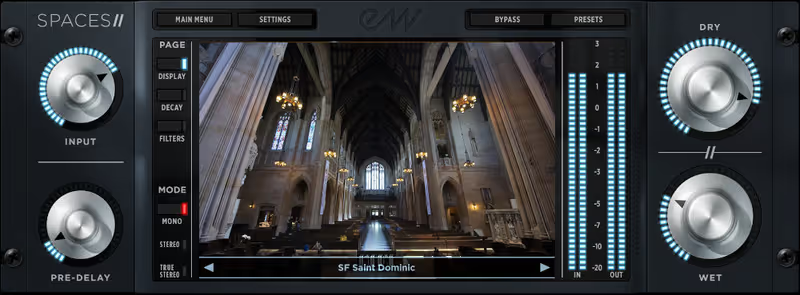
I have used Spaces II on almost every orchestral mock-up I have delivered in the last two years. Unlike other convolution engines that give you thousands of mediocre rooms, Spaces II focuses on a curated list of pristine, "True Stereo" locations. The hallmark of this plugin is the "S. Cal Hall" (a pseudonym for a very famous scoring stage), which instantly glues dry strings into a cohesive, Hollywood-sounding ensemble. It just works.

Deeper Look:
The interface is utilitarian but effective. You aren't meant to tweak these IRs heavily. You are meant to load them and mix. The "True Stereo" engine captures the complex interaction between source position and microphone array, meaning that panning an instrument into the reverb triggers the correct early reflections for that specific spot in the room. This makes it undeniably one of the best convolution reverbs for "setting and forgetting" an orchestral stage.

Playing connects you to YouTube, which may set cookies.
Heard on
Hollywood Film Scores AAA Game Soundtracks Trailer Music Mixing
Check price $104 (was $199)
02 Slate Digital

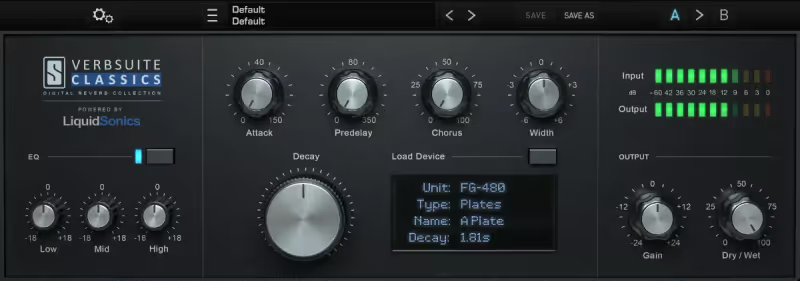
VerbSuite Classics

Best for Pop Mixing

Tested in our studio

Ten legendary hardware boxes with almost nothing to adjust, which is a strength on a pop mix and a limit on a scoring one.

Tested score
7.3
out of 10

How it scored

  • Sound Quality 8.0

    Excellent hardware character, but not built for the halls this file tests.

  • Workflow Speed 8.8

    Very simple. Pick a box, move on.

  • CPU Footprint 7.5

    10 GB and reasonable in use.

  • Metering & Control 5.0

    Almost no parameter tweaking, and iLok is required.

Why we picked it

Best for pop and rock mixing because it gives you the sound of ten legendary hardware units in one interface.

Who should skip it

Skip this if you specifically need the sound of realistic concert halls or post-production foley spaces.

The good

  • Access to Bricasti M7 sounds
  • Modulated tails sound alive
  • Very simple interface

The bad

  • Not designed for post-production
  • Requires iLok
  • Limited parameter tweaking
Engine
VST/AU/AAX
Type
Classic Hardware IRs
Size
10 GB
Price
$149
Why it scored that way

The sound of the 80s and 90s hardware in one plugin.

My Experience:
Verbsuite Classics is unique because instead of capturing real rooms, it captures the Impulse Responses of legendary hardware units like the Lexicon 480L and the Bricasti M7. In my mixing template, this is my go-to for adding that specific "glossy" sheen that you hear on top 40 records. It manages to bridge the gap between the static nature of convolution and the modulation of algorithmic units using LiquidSonics' Fusion IR technology.

Deeper Look:
The workflow is incredibly fast. You select a hardware model (like the "FG-480") and then browse its presets. The "Fusion IR" tech is the real winner here. Standard convolution can often sound static or "frozen," but Verbsuite captures the evolving modulation of the original hardware tails. It is indispensable for pop vocals and drums where you want the character of a vintage box without the hassle of maintenance.

Playing connects you to YouTube, which may set cookies.

Heard on
Modern Pop Vocals Rock Drums Electronic Music
Check price $149
03 Waves

IR1 Convolution Reverb

Best for Sound Design

The one to reach for when the reverb is the sound design rather than the space, and it costs almost no CPU to do it.

Score
8.0
out of 10

How it scored

  • Sound Quality 7.2

    Competent rather than class-leading, with a thinner stock library.

  • Workflow Speed 6.8

    Dated interface, and the Waves update plan gets in the way.

  • CPU Footprint 9.0

    Very low. You can run many instances without thinking.

  • Metering & Control 8.8

    Full ADSR over the impulse and easy custom IR import.

Why we picked it

Best for sound design and sculpting because it allows extensive ADSR manipulation of the impulse response.

Who should skip it

Skip this if you want the absolute cutting-edge in 3D realistic room simulation.

The good

  • Very low CPU usage
  • Detailed envelope shaping
  • Import custom IRs easily

The bad

  • Dated interface
  • Stock library counts are lower
  • Waves Update Plan usually required
Engine
VST/AU/AAX
Type
Standard Convolution
Size
4 GB
Price
$29
Why it scored that way

A flexible workhorse that has stood the test of time.

My Experience:
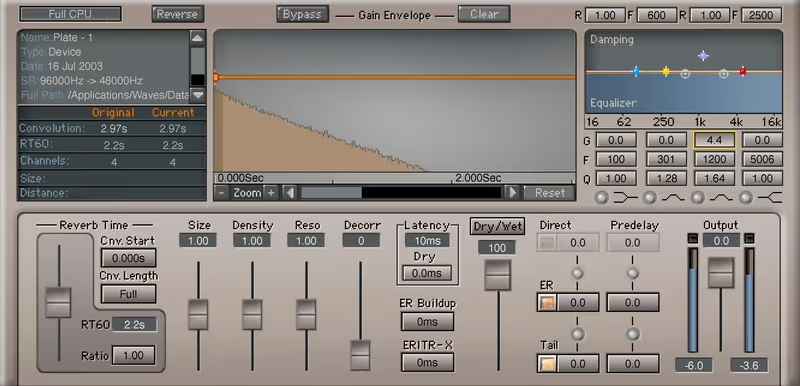
The Waves IR1 has been around for a long time, but it remains a staple in many studios because of its efficiency and control. While newer plugins focus on massive libraries or 3D positioning, IR1 gives you traditional ADSR controls over the impulse response itself. I often use this when I have a weird, specific IR (like a vacuum cleaner tube or a resonant glass jar) that I want to capture and then sculpt into a musical envelope.

Deeper Look:
One of the strongest features is the ability to import your own IRs and then manipulate their length and shape easily. It’s less about "putting you in a hall" and more about using convolution as a sound design tool. It’s light on CPU, comes with a decent library of famous venues (like the Sydney Opera House), and is constantly on sale, making it a great entry point for convolution mixing.

Playing connects you to YouTube, which may set cookies.

Heard on
Electronic Music Production Broadcast Mixing Legacy Sessions
Check price $29 (was $129)
04 MeldaProduction

MConvolutionMB

Best for Multiband FX

The most controllable reverb here by a distance, and the least likely to be dialled in quickly under deadline.

Score
7.5
out of 10

How it scored

  • Sound Quality 8.0

    Very good, and capable of things the others simply cannot do.

  • Workflow Speed 5.5

    Cluttered and steep. This is not a fast plugin.

  • CPU Footprint 7.0

    500 MB install, moderate load once multiband is engaged.

  • Metering & Control 9.5

    Multiband architecture and endless modulation. Best here.

Why we picked it

Best for creative sound design because of its multiband architecture and endless modulation options.

Who should skip it

Skip this if you get overwhelmed by complex interfaces and just want a simple 'hall' knob.

The good

  • Multiband processing is unique
  • Extremely customizable
  • Huge library of IRs

The bad

  • Steep learning curve
  • UI is cluttered
  • Overkill for simple mixing
Engine
VST/AU/AAX
Type
Creative Multiband
Size
500 MB
Price
$27
Why it scored that way

The most flexible convolution tool for creative sound design.

My Experience:
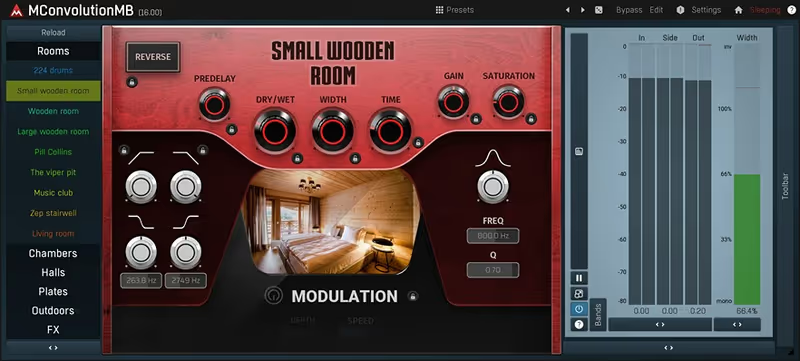
MeldaProduction plugins are known for being bottomless pits of features, and MConvolutionMB is no exception. This isn't just a reverb. It's a multiband processor where you can apply different IRs to different frequency bands. I use this for creative sound design: for example, putting a massive lush hall on the high end of a synth while keeping the bass completely dry or running it through a tight, muffled room IR.

Deeper Look:
The plugin comes with a surprisingly good library of natural and artificial spaces, but the real power is the modulation system. You can modulate the reverb parameters with LFOs, envelope followers, and randomizers. If you are a sound designer looking to create textured, evolving drones or unique spatial effects that realistically change over time, this is the best convolution reverb for your toolkit.

Playing connects you to YouTube, which may set cookies.

Heard on
Game Sound Design Experimental Electronic Complex Mixing
Check price $27 (was $54)
05 Kilohearts

Convolver

Best for Utility Mixing

A drag-and-drop IR loader that belongs in a modular chain, not on an orchestral mix bus.

Score
7.2
out of 10

How it scored

  • Sound Quality 6.0

    The stock library is very basic and there is no true stereo.

  • Workflow Speed 9.2

    Dead simple, and the snapin integration is excellent.

  • CPU Footprint 9.5

    100 MB and the lightest thing in this roundup.

  • Metering & Control 4.0

    A basic visualiser and no positioning. The weakest here.

Why we picked it

Best for fast creative workflows because of its lightweight CPU footprint and drag-and-drop simplicity.

Who should skip it

Skip this if you are mixing a 100-piece orchestral score and need true stereo positioning for every section.

The good

  • Incredibly lightweight
  • Snapin integration is great
  • Dead simple to use

The bad

  • Very basic library
  • No true stereo or positioning
  • Basic visualizer
Engine
VST/AU/AAX
Type
Snapin Convolution
Size
100 MB
Price
$39
Why it scored that way

Simple, fast, and light as a feather.

My Experience:
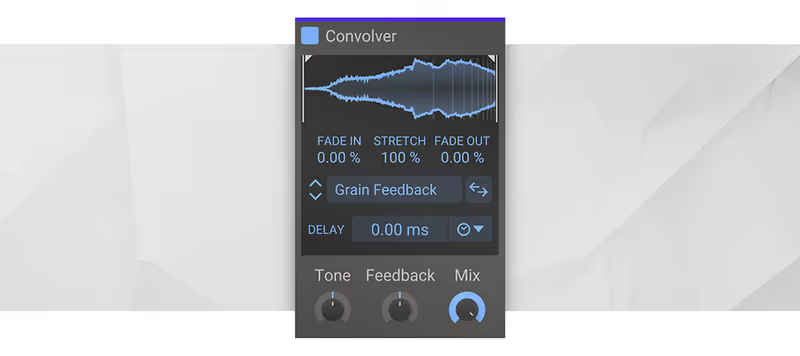
Sometimes you don't need a massive 50GB library. You just need to load an IR and keep moving. Convolver is my favorite utility reverb. It loads instantly, uses almost no CPU, and lets me drag and drop any sample to use as an IR. I use this heavily within Kilohearts' Snap Heap or Phase Plant to add body to synths or to create spectral resonances by loading samples of metallic textures as IRs.

Deeper Look:
The interface is tiny but functional. You have start and end controls, a stretch parameter (which is great for pitch-shifting the room tone), and a tone EQ. It’s not meant to compete with Altiverb for film scoring realism. It is meant to be a creative workhorse for electronic producers and sound designers who treat reverb as part of the synthesis process.

Playing connects you to YouTube, which may set cookies.

Heard on
Phase Plant Patch Design EDM Production Glitch & IDM
Check price $39
06 Audio Ease

Altiverb 7

Best for Post Production

The right answer for anything cut to picture, because no other library holds this many real, correctly captured spaces.

Score
8.3
out of 10

How it scored

  • Sound Quality 9.4

    Unrivalled depth of real-world spaces, updated regularly and free.

  • Workflow Speed 7.5

    The interface shows its age and the dongle is a nuisance.

  • CPU Footprint 7.8

    7 GB, lighter on disk than most of this list.

  • Metering & Control 8.5

    The positioning tool is genuinely useful for post work.

Why we picked it

Best for post-production and film sound because of its unmatched library of real-world static spaces.

Who should skip it

Skip this if you are a bedroom producer on a budget, as the price tag is significantly higher than the competition.

The good

  • Unrivaled library depth
  • Excellent positioning tool
  • Regular free IR updates

The bad

  • Very extremely expensive
  • Dongle often required
  • GUI is showing its age
Engine
VST/AU/AAX
Type
Post-Production IRs
Size
7 GB
Price
Check site
Why it scored that way

If you work in post, you simply need this.

My Experience:
Altiverb is legendary for a reason. In post-production, when I need to place ADR dialogue into the backseat of a 2004 Toyota Camry or a massive cathedral, Altiverb is the only plugin that has the specific IRs to do it convincingly. The library is massive and painstakingly recorded. It is the gold standard for matching production audio and creates the most convincing "real" spaces I have ever heard.

Deeper Look:
Beyond the library, the "Stage Position" tool is incredibly useful for orchestral composers. You can drag your sound source around the room in the GUI, and the engine adjusts the early reflections and delay times accordingly. While it is one of the most expensive plugins on this list, it is an investment in unparalleled realism vs lower-end alternatives. The browser is also excellent, letting you find rooms by size, brightness, or reverberation time.

Playing connects you to YouTube, which may set cookies.

Heard on
Major Motion Pictures TV Dialogue Editing Orchestral Mockups
Check price
07 LiquidSonics

Seventh Heaven

Best for Lead Vocals

Close enough to a Bricasti M7 that the distinction stops mattering, so long as one reverb sound is what you actually want.

Score
7.7
out of 10

How it scored

  • Sound Quality 9.5

    The best-sounding single reverb here. Dense and lush.

  • Workflow Speed 8.8

    Modern interface that gets out of the way.

  • CPU Footprint 6.0

    Noticeably CPU intensive across several instances.

  • Metering & Control 6.5

    It does one box very well and nothing else at all.

Why we picked it

Best for vocals and main instruments because it perfectly replicates the dense, lush sound of the Bricasti M7.

Who should skip it

Skip this if you prefer gritty, vintage spring or plate sounds. This is all about pristine modern luxury.

The good

  • Indistinguishable from hardware
  • Beautiful, modern interface
  • More affordable than hardware

The bad

  • Only does one thing (M7)
  • Can be CPU intensive
  • iLok required
Engine
VST/AU/AAX
Type
Bricasti M7 IRs
Size
10 GB
Price
Check site
Why it scored that way

The closest you can get to a $4,000 hardware unit.

My Experience:
The Bricasti M7 is arguably the best-sounding hardware reverb ever made, renowned for its lush, dense tails that never muddy a mix. Seventh Heaven is not just a collection of samples. It captures the exact behavior of the M7. I use this on almost every lead vocal and piano track. It provides a sense of depth and three-dimensionality that even other high-end convolution reverbs struggle to match.

Deeper Look:
LiquidSonics uses the same "Fusion IR" technology found in Slate's plugin (they developed it), but Seventh Heaven goes much deeper into the Bricasti architecture. You get control over the very specific low-frequency decay times and roll-offs that make the hardware so coveted. It is an essential tool for anyone who wants that expensive "sheen" on their tracks without buying the physical rack unit.

Playing connects you to YouTube, which may set cookies.

Heard on
Grammy-winning mixes Orchestral Halls Ambient textures
Check price

What didn’t make the list

3 cut
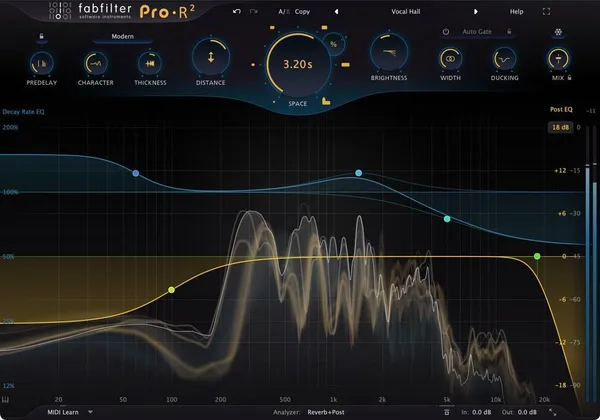
  • Pro-R 2 FabFilter

    Superb and far easier to dial in, but it is an algorithmic reverb, so it fell outside a convolution roundup.

  • Cinematic Rooms Professional LiquidSonics

    Excellent for scoring work and a genuine contender, though it is a hybrid design rather than a pure IR player.

  • MIR Pro 3D Vienna Symphonic Library

    The most convincing way to seat a sampled orchestra in a real hall. Priced and scoped as a whole positioning system, not a reverb plugin.

Read more →

Methodology

Who is this for

Working composers and producers who need reliability, speed, and character for professional scoring tasks.

Our testing process

Where we have tested a product, we do it in actual production scenarios, ranging from rapid sketches to commercial pitches, and we evaluate it in a dense template rather than in isolation. Where we have not, the product card says so and the assessment is drawn from specifications and documented behaviour instead.

Why you should trust us

We buy most reviewed plugins ourselves. Occasionally we receive NFRs for evaluation, but this never guarantees a review or positive verdict. We may earn commissions from links, but our editorial choices are never for sale.

Also considered

For every category, we audition the top 8 to 15 standard options, discarding any that suffer from poor scripting, slow load times, or uninspiring sampling.

Frequently Asked Questions

What is the difference between convolution and algorithmic reverb?

A convolution reverb replays a recording of how a real space responds to a sound, so it is accurate and largely fixed. An algorithmic reverb generates the tail mathematically, which is less literal and far more adjustable. Use convolution when the cue has to sound like a real hall and an algorithm when you need to shape the tail.

Should reverb go on each instrument or on a bus?

On a bus, fed by sends. One shared space is what makes an orchestral mockup sound like one orchestra in one room, and separate reverbs per instrument produce a set of players in a set of different rooms. Keep one main hall on a send and use short individual reverbs only to place something forward or back.

How do I stop convolution reverb muddying the low end?

High-pass the send rather than the source. Sending the full bass range into a long tail is the usual cause of orchestral mud, so filter the send somewhere between 200 and 300 hertz and let the low strings and basses stay dry. The ear places them from their harmonics, not from reverb on the fundamental.

Why is my convolution reverb using so much CPU?

Long impulse responses are expensive, and the cost scales with tail length rather than with the source material. One shared instance on a bus is far cheaper than a dozen inserts, and increasing the buffer size while mixing removes most of the remaining problem. Watch for reported latency if you are still recording.

Written By

Louis Raveton

Louis works across immersive scores (Venice Biennale, LVMH) and animation (Canal+), while producing Downtempo and Electro-Dub as Monsieur Shwill and Flagada. He treats his sample drive like a record collection, constantly hunting for the perfect 'imperfect' texture

Related Guides

All Guides →

New reviews, no noise

Occasional email when we publish something worth your time. No daily digest, no vendor press releases.

We store only your address, never sell it, and delete it as soon as you unsubscribe. See our privacy policy.