
Do This Now
- 1 Cut, never boost. You cannot add high end your way out of a muddy orchestral mix.
- 2 Decide which instrument owns 200Hz to 400Hz in each passage, then cut that band out of everything else.
- 3 When the horns carry the melody, cut 300Hz out of the cellos.
- 4 Use a dynamic EQ so the cut only engages when the conflicting instrument crosses the threshold.
- 5 Sweep a narrow high-Q band through the upper mids on brass and cut the 3kHz whistle by at least 6dB.
Playing connects you to YouTube, which may set cookies.
Virtual orchestras suffer from acoustic buildup precisely because they are inherently fake. Every instrument was recorded completely independently without natural acoustic bleed occurring in a real room. Mixing them together creates aggressive resonant spikes that ruin the balance of the final track.
Equalization in a cinematic mix must be entirely subtractive. You cannot boost your way out of a muddy mix by cranking the high frequencies. You must locate the offending masking frequencies and meticulously cut them out of the opposing instruments.
Clear the 200Hz to 400Hz Mud Zone
The absolute worst frequency zone in any virtual orchestra sits right between 200Hz and 400Hz. Cellos, French horns, bassoons, and large room reverbs all clump aggressively in this specific range. Playing thick chords with these instrument groups creates a muddy wash that destroys clarity instantly.
You must choose which specific instrument dominates this frequency band at any given moment. If the French horns are playing the primary melody, you must cut 300Hz aggressively out of the cellos. The most frustrating annoyance here is constantly automating EQ bypasses when the lead melody suddenly switches to the string section.
I use dynamic EQs to automate this masking problem automatically. A dynamic EQ only applies the frequency cut when the conflicting signal physically exceeds a certain volume threshold. This exact technique saved me days of manual volume automation on my last feature film mix.
- Problem zone
- 200Hz to 400Hz
- Usual cut
- 300Hz on the cellos
- Culprits
- Cellos, horns, bassoons, room reverb
- Tool
- Dynamic EQ, threshold triggered
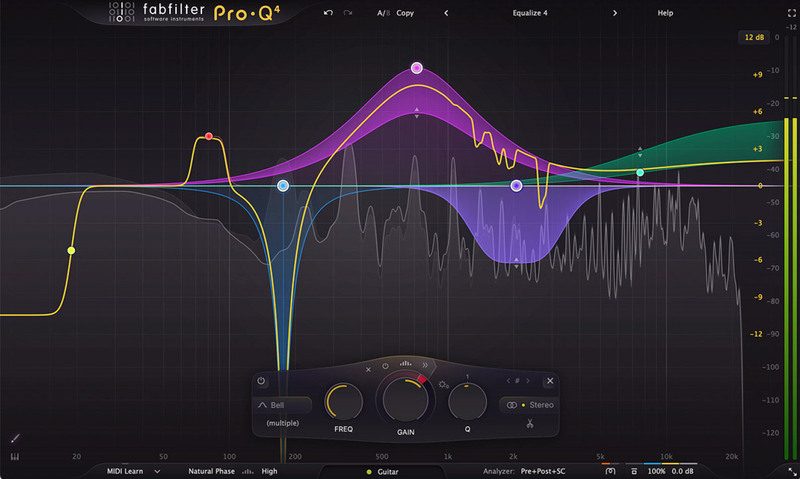
Notch Out the 3kHz Brass Whistle
Sampled brass libraries are notorious for building up incredibly harsh whistling frequencies around 3kHz. When you push the modulation wheel to the maximum forte dynamic, the brass becomes painfully brittle. This specific harshness fatigues the listener's ears extremely quickly during long action cues.
You must employ extremely tight, high-Q notch filters to remove these specific digital whistles. Sweep a narrow EQ band across the upper midrange until the painful frequency leaps out at you. Cut that exact spot by at least six decibels to sweeten the entire section instantly.
- Target
- Around 3kHz
- Band shape
- Narrow, high Q
- Cut depth
- 6dB minimum
- Worst at
- Full mod wheel, forte layers
Keep the CPU Alive Across a Full Template
Running forty surgical equalization plugins destroys modern computer processors rapidly. This forces composers to print their stems blindly before they finish balancing the final mix. Printing locked audio commits you to EQ decisions that you cannot undo during the final polish phase.
You must upgrade your computer hardware if you want to mix massive virtual templates natively in real time. Processing ninety instances of zero-latency digital EQs requires serious processing bandwidth. I recently upgraded my entire studio rig specifically to handle heavy convolution reverb and multi-band EQ simultaneously.
Related Articles
Best Apple Silicon Native VSTs (M1/M2/M3 Optimized)
Speed up your Mac. We review the best plugins that run natively on Apple Silicon for lightning-fast performance and lower CPU usage.
Best Essential Mixing Plugins (2026): The Toolkit
The absolute basics. We review the 7 indispensable plugins (Pro-Q 3, Ozone) that should be in every mixing template.
Best Orchestral EQs (2026): Clean & Surgical
Don't color the sound. We look at the most transparent EQs (Pro-Q 4, Oxford EQ) for carving out space in dense orchestral templates.
Frequently Asked Questions
Which frequency range causes orchestral mud?
Between roughly 200 and 400 Hz, where the low mids of every section overlap. A dense mockup stacks violas, horns, low woodwinds and cellos into the same octave, and each one is carrying its recorded room in that range as well. Cut narrow and on individual sections rather than broadly on the bus.
Should I EQ the sections or the master bus?
The sections. Master bus EQ on an orchestral mix moves the recorded hall along with the instruments, which is what makes a mockup sound processed. Fix the conflict where it happens, and reserve the bus for gentle broad shaping.
How do I stop brass sounding harsh without dulling it?
Find the specific resonance rather than shelving the top end. Harshness in sampled brass usually sits in a narrow band between 2 and 4 kHz and only appears at loud dynamics, so a dynamic EQ that engages on the fortissimo layers keeps the bite at lower dynamics.
Is subtractive EQ always better than boosting?
For virtual orchestras, largely yes. The samples already contain the tone the recording engineer chose, so boosting mostly amplifies the room and the noise floor with it. Cutting what conflicts leaves the character intact.
More Guides
All Guides →RAM vs. CPU: Hardware Optimization for Kontakt Master Templates
A highly technical guide to balancing memory usage, storage speeds, and processing power when running massive Kontakt orchestral templates.
The Basics of Mixing Cinematic Music: Depth, Width, and Phase
Advanced techniques for placing orchestral instruments into a 3D soundstage using precise panning, multi-tier reverb, and subtractive EQ.
Divisi Strings Explained, and Why Your Chords Sound Like a Wall
Sixteen violins playing one line is a section. Sixteen violins split four ways is four thin sections. When divisi helps, when it costs you, and how to fake it in samples.
New reviews, no noise
Occasional email when we publish something worth your time. No daily digest, no vendor press releases.
We store only your address, never sell it, and delete it as soon as you unsubscribe. See our privacy policy.

Henry Foster
Henry is a mixing engineer with a background in broadcast and post-production. He obsesses over signal flow, gain staging, and the subtle coloration of analog-modeled plugins. His reviews focus on technical precision, CPU efficiency, and UI workflow.