


The 7 Best Granular Synth Plugins for Textural Sound Design

Granular synthesis is the quickest way to turn a rusty door hinge into a terrifying alien landscape.

Ewan Clarke
By Ewan Clarke Synth Specialist & Sound Designer

What changed: The page now answers the questions readers ask about the category, in a FAQ section at the foot of it.

ModWheel is reader-supported. When you buy through links on this page we may earn an affiliate commission, at no extra cost to you. This never influences which products we recommend, read our testing methodology.

Prices come from the store's own feed and were last checked 1 September 2026. We don't issue discount codes — the price you see is the store's own.

Pick one in 10 seconds

Short version
  • You want rhythmic glitching that stays musical Distinctive enough that it can stamp a whole score. Portal
  • You need smooth cinematic atmospheres and pads Padshop 2
  • You want to see every modulation while you build it Pigments 7
  • You need surgical multiband grain control MGranularMB
  • You want to build the whole signal path yourself Phase Plant

Compare all 7

Portal 7.1
Format
VST/AU/AAX
Protection
Serial
$75 $149 View price
Pigments 7 8.2
Format
VST/AU/AAX
Protection
Arturia Software Center
Padshop 2
3. Padshop 2 Steinberg
8.1
Format
VST/AU/AAX
Protection
eLicenser/Steinberg Licensing
Format
VST/AU/AAX
Protection
Serial
MGranularMB
5. MGranularMB MeldaProduction
8.0
Format
VST/AU/AAX
Protection
License File
$27 $54 View price
Phase Plant
6. Phase Plant Kilohearts
8.0
Format
VST/AU/AAX
Protection
Serial
Current 2.0
7. Current 2.0 Minimal Audio
7.5
Format
VST/AU/AAX
Protection
Account Login

Finding the best granular synth plugins is essential for modern sound design and cinematic production. I rely on granular processing daily to rescue boring audio and transform it into moving, textured atmospheres. Sometimes, a flat piano chord needs to become an evolving pad of metallic dust.

Granular processing breaks audio into tiny grains, rearranging them into something entirely new. In this detailed granular synthesizer review, I focus on tools that are actually usable on a deadline. A lightweight alternative to complex modular environments is often exactly what a track needs to come alive. Here are the plugins I consistently use to mangle audio.

Several of these picks also appear in our 5 Best Wavetable Synths for Bass Music (2026) roundup, which is worth a look if you are weighing up both.

Top Picks

01 Output

Portal

Best for Musical Glitch

Tested in our studio

The fastest route to musical granular movement, and distinctive enough that it can stamp itself on everything you use it in.

Tested score
7.1
out of 10

How it scored

  • Sound Design Range 6.5

    Rhythmic work only. It is an effect, not a granular synth.

  • Preset Quality 9.0

    The preset library does almost all of the persuading.

  • CPU Footprint 7.8

    Reasonable across a few instances.

  • Modulation Depth 5.0

    Macros over grain control. No surgical editing at all.

Why we picked it

Best for rhythmic glitching and musical delays because of its intuitive macro controls.

Who should skip it

Avoid if you need deep, surgical grain editing for ambient stretch effects.

The good

  • Very intuitive and musical interface.
  • Excellent preset library.
  • Great for rhythmic elements.

The bad

  • Not a traditional synthesizer.
  • Lacks deep grain editing.
  • Can make everything sound like 'Portal'.
Format
VST/AU/AAX
Protection
Serial
Price
$75
Why it scored that way

A granular effect that is actually musical rather than purely chaotic.

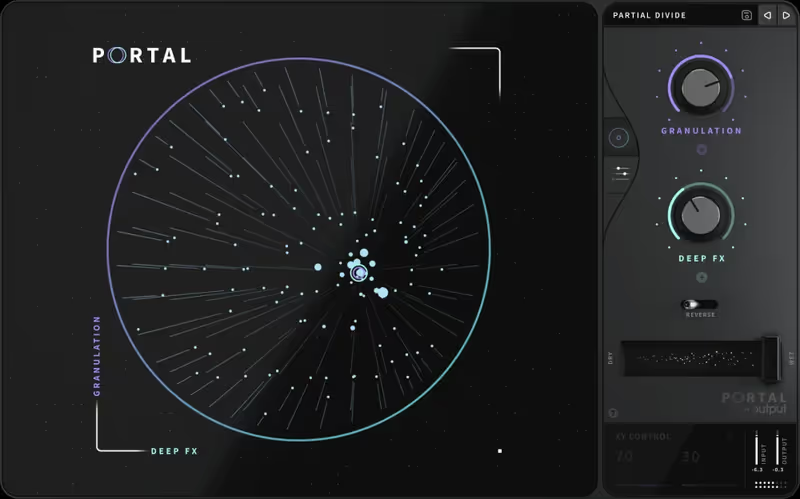
Portal is the tool I load when a synth line feels rigid and needs immediate rhythmic movement. During a recent electronic dub session, I ran a very dry pluck through Portal, and it immediately spat out a stuttering, pitched-delay effect that became the core groove. It excels at taking rhythmic elements and adding a layer of controlled, bouncing digital dust. This makes it arguably the best granular delay for producers who want quick, usable results.

The circular macro interface is intuitive, but it lacks the deep, microscopic waveform editing found in more scientific granular tools. If you want to surgically isolate a three-millisecond grain of audio and stretch it to infinity, this is not the right plugin. It is an effect meant to be played live and tweaked aggressively, prioritizing workflow speed over deep mathematical precision.

Where it sits against the rest of this list: Portal is an effect rather than a synthesiser, and that distinction determines whether it is the right purchase. Everything else on this page generates sound from a source you load, whereas Portal sits on a channel and granulates whatever is already playing. That makes it the fastest route to granular texture inside an existing arrangement, and the reason it appears on so many mix templates. Its tempo-synced approach keeps results musical rather than chaotic, which is both its strength and its ceiling. If you want to build an instrument from a grain cloud, Padshop or FRMS below are the tools. If you want to make the track you already have sound broken in a controlled way, this is it.

Playing connects you to YouTube, which may set cookies.
Heard on
Modern Pop Production Electronic Dance Music Beatmaking
Check price $75 (was $149)
02 Arturia

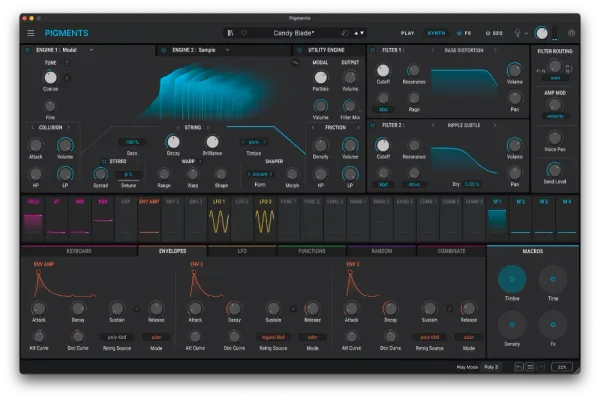
Pigments 7

Best for Sound Design

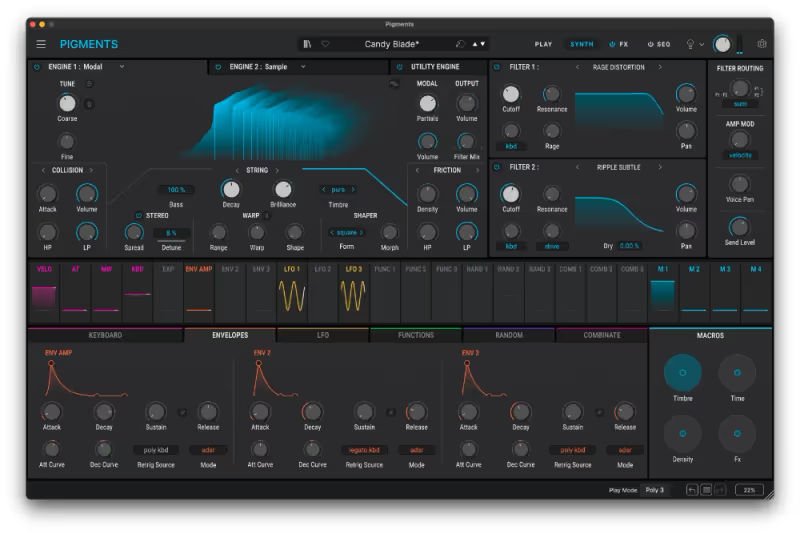
The most legible granular engine here, provided you have the screen and the CPU headroom it assumes.

Score
8.2
out of 10

How it scored

  • Sound Design Range 9.2

    Granular sits alongside several other engines in one instrument.

  • Preset Quality 8.8

    Strong bank that shows what the modulation system can do.

  • CPU Footprint 5.5

    Very intensive, and it wants a large display to be usable.

  • Modulation Depth 9.4

    The colour-coded routing is the best in this roundup.

Why we picked it

Best for visual sound design because of its incredible color-coded modulation interface.

Who should skip it

Avoid if you have an older computer that struggles with heavy CPU loads.

The good

  • Incredible visual feedback.
  • Combines granular with other engine types.
  • Brilliant modulation system.

The bad

  • Very CPU intensive.
  • Almost too many options for simple tasks.
  • Requires a large display to appreciate fully.
Format
VST/AU/AAX
Protection
Arturia Software Center
Price
$199
Why it scored that way

A visual masterpiece that makes complex granular synthesis surprisingly easy.

While Pigments is a massive multi-engine synthesizer, its granular engine alone justifies the price of admission. Last week, I dragged a recording of a rusty gate into the sample slot, added some random modulation to the grain position, and instantly had a terrifying atmospheric drone. The visual feedback is incredible, showing you exactly how your modulation sources are affecting the audio grains in real time. It is a top-tier best granular synth VST for composers who need visual context.

Because it is a powerhouse synth with analog, wavetable, and granular engines, the CPU hit can be violently high on older machines. The sheer amount of options can lead to analysis paralysis when you are on a tight deadline. However, the color-coded modulation system is brilliant, allowing you to build complex routing patches without ever opening a manual.

Where it sits against the rest of this list: Pigments is on this page as a generalist that happens to have a strong granular engine, not as a granular specialist, and that framing should guide the decision. Its advantage is context: the granular layer sits alongside wavetable, analogue and harmonic engines inside one instrument with a shared modulation system, so a granular texture can be filtered, sequenced and layered without leaving the plugin or routing anything. For a composer that integration is usually worth more than the extra depth a dedicated tool offers. The counterargument is that a specialist like MGranularMB will do things to a sample that Pigments simply cannot. Buy Pigments if you want one synth, and buy alongside it if granular is your main interest.

Playing connects you to YouTube, which may set cookies.
Heard on
Cinematic Soundscapes Modern Synthwave Experimental Bass
Check price $199
03 Steinberg

Padshop 2

Best for Cinematic Pads

Tested in our studio

The smoothest-sounding granular synth on this list, and the spectral oscillator is why it belongs in a scoring template.

Tested score
8.1
out of 10

How it scored

  • Sound Design Range 8.8

    Spectral and granular engines that genuinely complement each other.

  • Preset Quality 8.5

    A strong factory library aimed squarely at atmosphere.

  • CPU Footprint 7.5

    Efficient for the sound quality it produces.

  • Modulation Depth 7.5

    Deep, though sample import is clunky and the spectral side is steep.

Why we picked it

Best for creating smooth cinematic atmospheres because of its spectral oscillator.

Who should skip it

Avoid if you want an exciting, modern hyper-visual UI.

The good

  • Deep spectral and granular engines.
  • Incredibly smooth sound quality.
  • Great factory library.

The bad

  • Clunky sample import process.
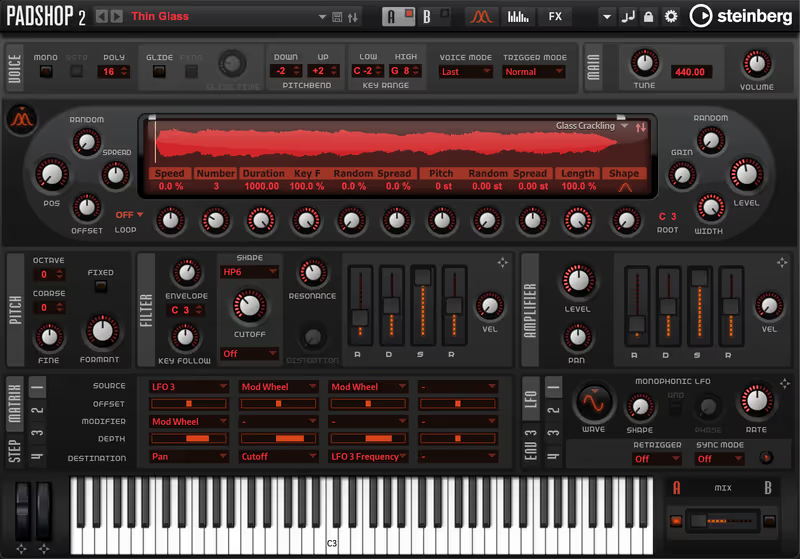
  • Clinical user interface.
  • Steep learning curve for spectral features.
Format
VST/AU/AAX
Protection
eLicenser/Steinberg Licensing
Price
$129
Why it scored that way

Steinberg's dedicated machine for building haunting, evolving pads.

Padshop 2 is a staple in my workflow for creating dark, brooding cinematic atmospheres from scratch. I recently loaded a simple vocal breath sample into it, and within minutes, I had a complex, spectral choir patch that sounded entirely organic. It features a spectral oscillator alongside the granular engine, allowing you to manipulate the harmonic fingerprint of the sound deeply. It stands out nicely as the best granular instrument for atmospheric pad creation.

The interface feels a bit clinical and dated compared to modern sci-fi UI designs, which can be uninspiring. The workflow of loading user samples is also slightly clunky, requiring a few too many clicks to get started. Once you overcome the sterile interface, the audio engine itself sounds incredibly lush, smooth, and expensive.

Where it sits against the rest of this list: Padshop is the most focused instrument here in terms of intent: it is built to make evolving pads and cinematic beds, and it does not pretend otherwise. That focus is why it remains a fast tool for scoring work, where the requirement is usually a texture that moves slowly and sits under everything else rather than a sound design centrepiece. Version 2 added a spectral oscillator alongside the granular one, which widens the palette considerably. Its limitation is the other side of its strength. If you need aggressive, rhythmic granular destruction, the Melda and Minimal Audio entries are built for that and this is not.

Heard on
Film Scoring Ambient Music Sound Installations
Check price $129
04 Imaginando

FRMS - Granular Synthesizer

Best for FM Hybrid

An unusual FM and granular hybrid at almost no CPU cost, held back by an interface that tells you nothing.

Score
7.2
out of 10

How it scored

  • Sound Design Range 7.5

    The FM and granular fusion produces sounds the others cannot.

  • Preset Quality 6.0

    Sparse, and it turns harsh and digital quickly.

  • CPU Footprint 9.2

    The lightest plugin in this roundup, with mobile versions too.

  • Modulation Depth 6.0

    Capable, but the routing is not discoverable from the interface.

Why we picked it

Best for experimental digital sounds because of its FM and granular engine fusion.

Who should skip it

Avoid if you hate minimalist, unlabeled user interfaces.

The good

  • Unique FM and granular combination.
  • Very lightweight on CPU.
  • Cross-platform with mobile versions.

The bad

  • Cryptic, minimalist UI.
  • Sound can be very harsh and digital.
  • Modulation routing is not immediately obvious.
Format
VST/AU/AAX
Protection
Serial
Price
$94
Why it scored that way

A strangely engaging synth that combines FM and granular processing.

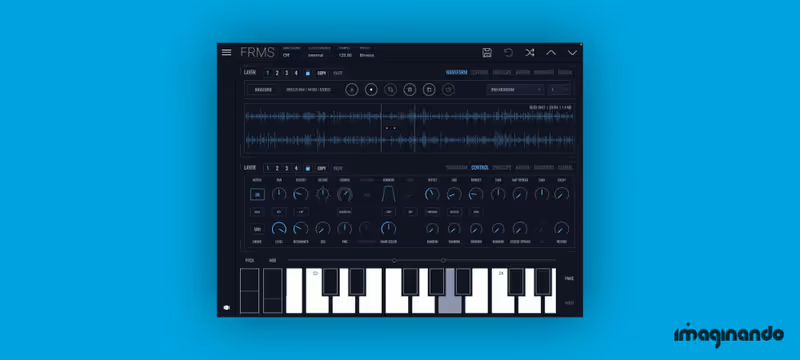
FRMS caught my attention because it attempts to merge granular synthesis with traditional FM synthesis layers. During a downtime session, I started layering a harsh FM bell tone with a granulated cello sample, creating a highly unusual, metallic hybrid texture. It forces you to think differently about how digital artifacts and organic samples can interact. It is certainly a fascinating choice for the best experimental granular synth category.

The interface is aggressively minimalist, lacking labels on many parameters until you hover or click them. This slows down the workflow significantly when you are trying to find the grain envelope shape under pressure. Once you memorize the layout, it is surprisingly capable, particularly for crafting weird, glitchy percussion and heavily digital-sounding basslines.

Where it sits against the rest of this list: FRMS is the hybrid on this page, combining granular playback with FM synthesis in the same voice, and that combination is genuinely unusual rather than a marketing line. FM produces metallic, inharmonic content that granular processing then smears and reshapes, which reaches timbres neither method gets to alone. It is the entry for someone who already understands both techniques and wants them interacting. For anyone else it is the steepest learning curve here, and the interface does little to soften it. Judged purely on cost per unfamiliar sound it is arguably the best value on the page, provided you are prepared to spend time working out how to drive it.

Heard on
Experimental IDM Glitch Hop Sound Design
Check price $94
05 MeldaProduction

MGranularMB

Best for Multiband Destruction

Tested in our studio

The most precise granular tool available and the least pleasant to use, which is the standard Melda bargain.

Tested score
8.0
out of 10

How it scored

  • Sound Design Range 8.8

    Multiband granular reaches places nothing else here can.

  • Preset Quality 6.5

    Functional, and hard to audition through the interface.

  • CPU Footprint 7.0

    Moderate until the band count climbs.

  • Modulation Depth 9.5

    Unmatched depth and precision. Best in this roundup.

Why we picked it

Best for surgical mix mangling because of its powerful multiband capabilities.

Who should skip it

Avoid if ugly interfaces kill your creative inspiration.

The good

  • Unmatched multiband precision.
  • Incredible depth of modulation.
  • Extremely high audio quality.

The bad

  • Horrible user interface.
  • Intimidating learning curve.
  • Overkill for simple tasks.
Format
VST/AU/AAX
Protection
License File
Price
$27
Why it scored that way

An absolute powerhouse of multiband granular destruction.

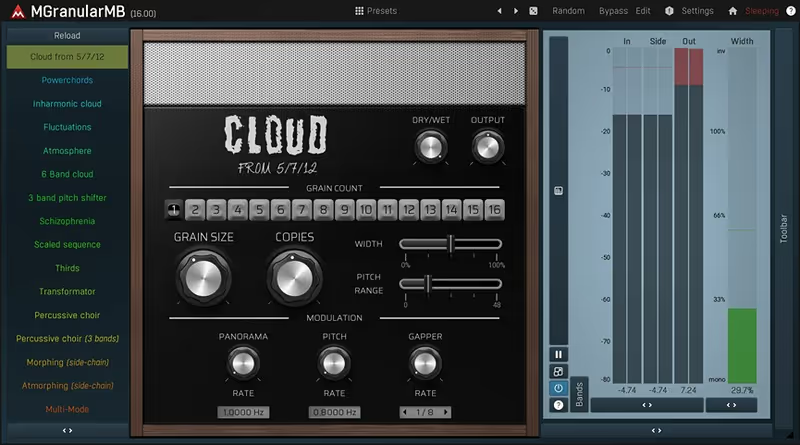
Melda plugins always prioritize extreme technical depth, and MGranularMB is no exception to that rule. I used it on a heavily distorted drum bus, isolating and granulating only the high-frequency cymbals while leaving the kick drum completely intact. The multiband capability allows for a level of surgical precision that most other plugins simply lack. It is absolutely the best multiband granular effect for deep mix processing and mastering contexts.

Like all Melda tools, the interface is incredibly ugly and dense, resembling a Windows 95 spreadsheet more than a modern creative tool. It takes serious dedication to understand how to route the complex modulators and multi-parameters effectively. If you can look past the horrendous aesthetics, the audio processing quality and raw power are practically unmatched in the industry.

Where it sits against the rest of this list: The Melda entry is the specialist, and the multiband part is the reason. Granulating a full-range sample usually turns the low end to mush, because grain windows short enough to be interesting are shorter than a bass waveform. Splitting the signal and granulating only the upper bands solves that directly, which means you can apply extreme processing and keep a usable bottom octave. Nothing else on this page does that. The tradeoff is Melda's interface, which is dense and unapologetically technical, and a preset library that is more demonstration than starting point. This is the tool you grow into once the friendlier options stop being enough.

Heard on
Advanced Sound Design Post-Production Mastering Effects
Check price $27 (was $54)
06 Kilohearts

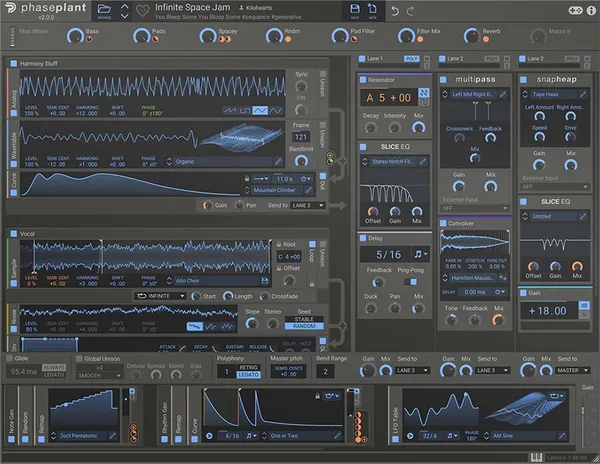
Phase Plant

Best for Modular Design

A blank modular canvas rather than a granular synth, which is either the whole appeal or completely the wrong tool.

Score
8.0
out of 10

How it scored

  • Sound Design Range 9.4

    Generators stack without limit, so the ceiling is your patience.

  • Preset Quality 7.5

    Good, though the instrument assumes you will build your own.

  • CPU Footprint 5.8

    It will happily crash the CPU if you keep stacking.

  • Modulation Depth 9.2

    Effectively unlimited routing, with effects sold separately.

Why we picked it

Best for advanced modular sound design because of its limitless routing possibilities.

Who should skip it

Avoid if you prefer immediate, pre-routed synthesizer architectures.

The good

  • Limitless modular architecture.
  • Generators can be stacked infinitely.
  • Very fast, modern workflow.

The bad

  • Blank slate UI can be intimidating.
  • Effects modules sold separately.
  • Can easily crash CPU if pushed.
Format
VST/AU/AAX
Protection
Serial
Price
$199
Why it scored that way

A modular sandbox that happens to have a brilliant granular generator.

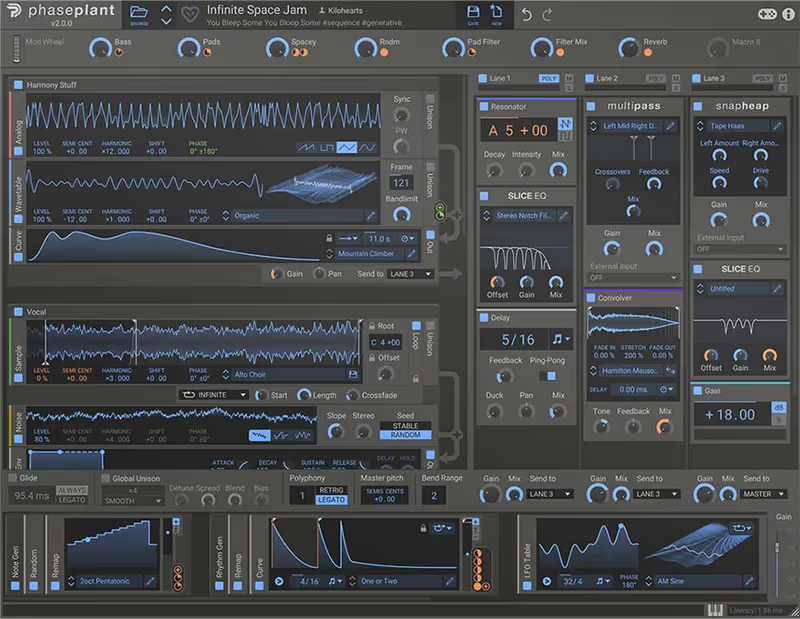
Phase Plant is a modular beast, and its relatively recent addition of a granular generator made it completely indispensable for me. I often build complex patches where a granular oscillator is modulated by an audio-rate LFO, creating incredibly dense, tearing neuro-bass textures. It allows you to stack as many granular generators as your CPU can handle. For modular enthusiasts, this is easily the best granular synth environment available today.

The blank slate approach is terrifying if you just want to open a plugin and get an instant, usable sound. You have to build your entire synth architecture from scratch, adding your own envelopes, filters, and effects modules. However, for sheer sound design flexibility and lack of restrictions, nothing else really touches it.

Where it sits against the rest of this list: Phase Plant is a modular environment in which granular is one available generator rather than the point of the instrument, so it belongs here on capability rather than on focus. You build the signal path yourself, which means a granular source can feed anything, be modulated by anything and sit alongside other generators in the same patch. For sound designers that ceiling is the attraction. For a composer who wants a pad in ninety seconds it is the wrong tool, and Padshop above will finish the job before Phase Plant has been configured. Its snapin system also means the plugin you buy today keeps growing, which changes the value calculation over a few years.

Playing connects you to YouTube, which may set cookies.
Heard on
Neurofunk Dubstep Production Game Audio
Check price $199
07 Minimal Audio

Current 2.0

Best for Modern Electronic

The quickest route from opening the plugin to a finished granular sound, and the first here to hit a ceiling if you want to take a sample apart.

Score
7.5
out of 10

How it scored

  • Sound Design Range 7.8

    Colours a sample well. Melda and Phase Plant go further at the extremes.

  • Preset Quality 8.8

    A large curated library that gets you usable before you understand grains.

  • CPU Footprint 6.2

    The effects rack is most of the cost of leaving it open.

  • Modulation Depth 7.0

    Workflow-first, not modular. Enough to move a pad, not to build one.

Why we picked it

Best for modern electronic production because of its integrated sample cloud and pristine effects.

Who should skip it

Avoid if you strongly oppose subscription or cloud-based plugin models.

The good

  • Pristine, ultra-modern sound.
  • Incredible built-in effects rack.
  • Integrated cloud sample access.

The bad

  • Cloud model is controversial.
  • UI is aggressively dark.
  • Relatively high CPU usage.
Format
VST/AU/AAX
Protection
Account Login
Price
$199
Why it scored that way

A slick, modern ecosystem synth with a phenomenal granular core.

Our testing here was done on the first version of Current, which Minimal Audio has since replaced with Current 2.0. The new version has not been through the same work, so read this as an assessment of the line rather than of the update. What earned it a place is the combination of a capable granular engine with an effects rack good enough that you rarely leave the plugin.

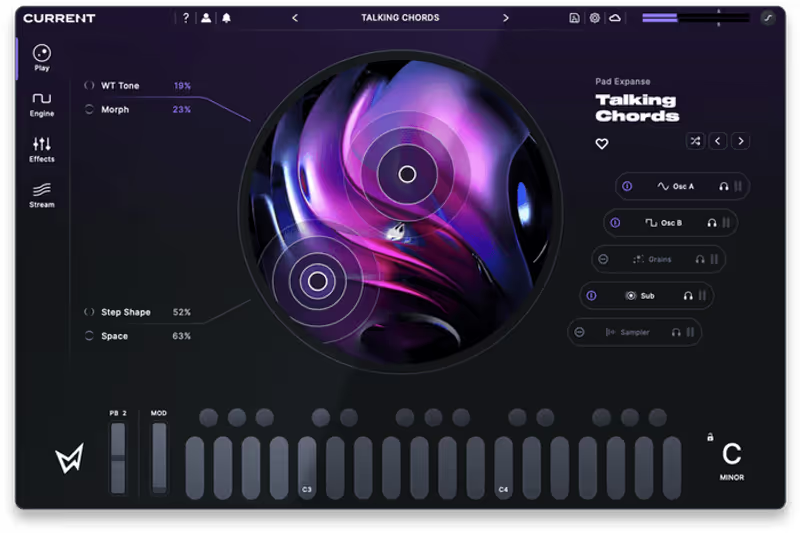
I dumped a harsh vocal scream into the granular engine and the effects rack polished it into a wide cinematic riser without a single insert after it. The integrated cloud sample platform lets you pull fresh audio straight into the granular engine, which shortens the distance between hearing an idea and having it in the session. For a producer working to a deadline that matters more than it sounds.

The cloud and account model has frustrated people who prefer owning software outright, and that is a real objection rather than a quibble. The interface is very dark, which looks sharp and causes eye strain across a long session. Neither undoes the quality of the granular engine or the distortion effects sitting next to it.

Where it sits against the rest of this list: Current is the modern, workflow-first option, aimed at electronic producers who want granular results without studying granular synthesis. Its granular engine is genuinely capable, but the reason to choose it over the specialists is the surrounding design: a large curated preset library, a clean interface and effects built in, so a usable sound arrives quickly and can be adjusted by ear rather than by understanding grain density. That is a legitimate priority and an underrated one. Where it loses is at the extremes. Producers who want to dismantle a sample rather than colour it will run into its ceiling faster than they would with Melda or Phase Plant.

Heard on
Bass Music Modern Pop Future Garage
Check price $199
Read more →

Methodology

Who is this for

Working composers and producers who need reliability, speed, and character for professional scoring tasks.

Our testing process

Where we have tested a product, we do it in actual production scenarios, ranging from rapid sketches to commercial pitches, and we evaluate it in a dense template rather than in isolation. Where we have not, the product card says so and the assessment is drawn from specifications and documented behaviour instead.

Why you should trust us

We buy most reviewed plugins ourselves. Occasionally we receive NFRs for evaluation, but this never guarantees a review or positive verdict. We may earn commissions from links, but our editorial choices are never for sale.

Also considered

For every category, we audition the top 8 to 15 standard options, discarding any that suffer from poor scripting, slow load times, or uninspiring sampling.

Frequently Asked Questions

What is granular synthesis, in practical terms?

A granular engine chops audio into very short fragments called grains and replays them with independent control over position, pitch, size and density. Because the playback position is no longer tied to time, you can hold one moment of a recording indefinitely, which is where the clouds and drones come from.

Why does my granular patch sound buzzy or metallic?

Because the grains are repeating at a rate the ear hears as pitch. When grain size and spacing stay constant, the repetition itself becomes a tone sitting on top of your source. Randomise position and size by a few per cent and the buzz turns back into texture.

What source material works best for granular processing?

Sustained material with harmonic content, such as a held vocal note, a bowed string or a pad. Transient heavy sources smear, because a grain that lands on an attack repeats that attack until it sounds like a stutter. If you want to granulate a drum loop, use it for rhythm rather than for texture.

Is granular synthesis expensive on CPU?

Yes, since density is literally a count of how many grains are playing at once and each one costs. A dense pad can run hundreds of voices before any effects. Print the track once the sound is right, which also stops the randomisation from changing on the next playback.

Written By

Ewan Clarke

Ewan is a sound designer whose patches have appeared in major wavetable synths and cinematic scoring libraries. A self-confessed modular addict, he bridges the gap between West Coast experimentation and pop-ready polish. He believes every preset should tell a story.

Related Guides

All Guides →

New reviews, no noise

Occasional email when we publish something worth your time. No daily digest, no vendor press releases.

We store only your address, never sell it, and delete it as soon as you unsubscribe. See our privacy policy.