

6 Best Amp Simulators for Home Studios (2026)

If you are still trying to mic a loud tube amp in a tiny apartment bedroom, your recordings are suffering.

Felix Ward
By Felix Ward Songwriter & Multi-Instrumentalist

What changed: Every pick now carries a verdict line and scores for clean headroom, breakup realism, amp selection and CPU, and there is a decision router at the top. It also answers the questions readers ask about the category.

ModWheel is reader-supported. When you buy through links on this page we may earn an affiliate commission, at no extra cost to you. This never influences which products we recommend, read our testing methodology.

Prices come from the store's own feed and were last checked 1 September 2026. We don't issue discount codes — the price you see is the store's own.

Pick one in 10 seconds

Short version

Compare all 6

AmpliTube 5
1. AmpliTube 5 IK Multimedia
7.8
Protection
IK Product Manager
Guitar Rig 7 Pro
2. Guitar Rig 7 Pro Native Instruments
7.6
Protection
Native Access
Protection
iLok
bx_rockrack V3 7.7
Protection
Plugin Alliance Installation Manager
$30 $75 View price
Protection
Serial Key
6. BIAS Essential Positive Grid
7.9
Protection
Positive Grid Account

Finding the best amp simulators for home studios is the most important decision a modern guitarist can make. Recording physical guitar amplifiers in an untreated bedroom usually results in muddy, unusable audio plagued by terrible room reflections. The top virtual guitar plugins eliminate this massive frustration entirely by delivering pristine, studio-quality tones directly into your headphones.

You need a digital guitar rig that reacts dynamically to your playing volume without sounding excessively harsh or digitally fizzy. A great software suite replaces thousands of dollars of heavy amplifiers and boutique stompboxes with ultimate convenience. The right choice depends on your approach, such as preferring a massive sandbox pedalboard or a simple, curated selection of classic vintage amps.

Several of these picks also appear in our 6 Best Metal Amp Sims for Modern Djent Tones (2026) roundup, which is worth a look if you are weighing up both.

None of this applies to an acoustic, which needs a convincing body resonance rather than a convincing speaker cabinet. Our Best Acoustic Guitar VSTs and Plugins roundup covers that side of the problem.

Top Picks

01 IK Multimedia

AmpliTube 5

Best for Digital Pedalboard

The largest gear collection in software, wrapped in a shop, which is the price of it being the largest.

Score
7.8
out of 10

How it scored

  • Clean Headroom 8.0

    Solid across the licensed models, without a standout clean amp.

  • Breakup Realism 8.0

    Improved by the volumetric cabinets, and still a step behind the component-modelled entries.

  • Amp Selection 9.8

    Hundreds of officially licensed models. Best on the page by a distance.

  • CPU Efficiency 5.5

    Heavy, with an install footprint to match. Lowest here.

Why we picked it

Best for comprehensive gear replication because it features hundreds of officially licensed, exact replicas of famous hardware.

Who should skip it

Avoid if you hate navigating complex menus or dealing with aggressive in-app purchase prompts.

The good

  • Massive collection of licensed hardware models
  • Greatly improved volumetric cabinet simulation
  • Incredibly flexible signal chain routing

The bad

  • Bloated user interface with in-app purchases
  • Can easily induce decision paralysis
  • Extremely large hard drive installation footprint
Format
VST/AU/AAX
Protection
IK Product Manager
Price
$199
Why it scored that way

This is the ultimate digital playground for guitarists who want access to a limitless collection of iconic gear.

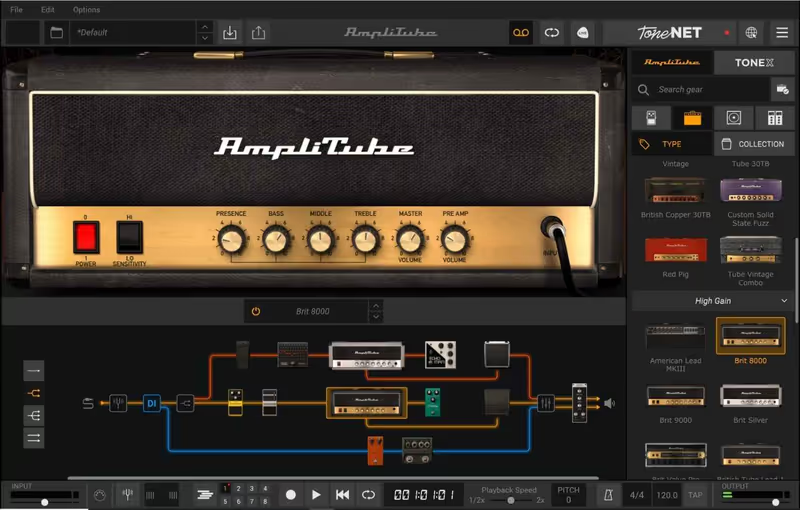
AmpliTube 5 provides an absolutely staggering amount of officially licensed gear, allowing you to accurately recreate the exact signal chain of almost any famous guitarist. The completely redesigned volumetric impulse response engine drastically improves the realism of the cabinet simulation, successfully eliminating the harsh digital artifacts found in previous versions. I frequently use the officially licensed Fender collection when I need a pristine, sparkling clean tone for indie pop rhythm tracks.

The massive gear collection is undeniably fantastic, but the preset management system is horribly bloated and frequently pushes you toward purchasing additional gear within the application. Furthermore, navigating the massive menus can easily induce decision paralysis when you just want a simple overdriven tone quickly. However, if you are patient enough to build your own custom rigs, it is an incredibly powerful Guitar Rig 7 alternative.
Heard on
Joe Satriani Slash Marty Friedman
Check price $199
02 Native Instruments

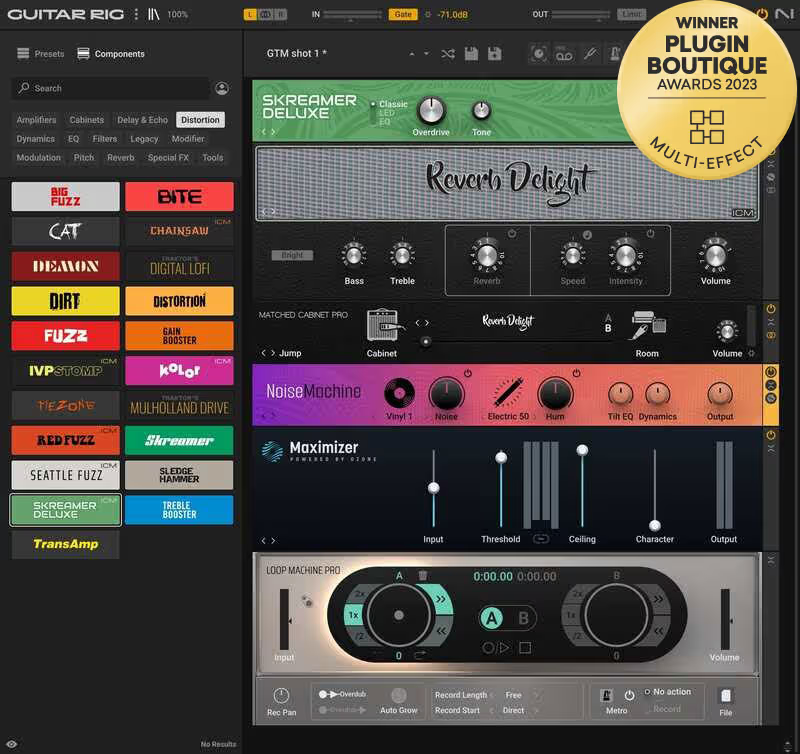
Guitar Rig 7 Pro

Best for Creative Effects

The one here that is really an effects rack with amps attached, which is why it is the best of these on a synth.

Score
7.6
out of 10

How it scored

  • Clean Headroom 8.0

    Clean and usable, and not the reason anyone loads this.

  • Breakup Realism 8.5

    The machine learning models closed most of the gap that used to exist.

  • Amp Selection 6.5

    Fewer amps than the competition, and far more effects.

  • CPU Efficiency 7.5

    Reasonable until the rack gets long.

Why we picked it

Best for creative sound design because the massive collection of unconventional effects allows you to completely mangle your guitar signal.

Who should skip it

Avoid if you strictly want a simple, photorealistic layout resembling a traditional physical pedalboard.

The good

  • Incredible collection of creative effects
  • Highly flexible modular rack interface
  • Excellent machine learning amplifier models

The bad

  • Fewer total amplifier models than competitors
  • Interface can feel slightly clinical
  • Requires Native Instruments ecosystem
Format
VST/AU/AAX
Protection
Native Access
Price
$189
Why it scored that way

This plugin treats your guitar signal like a blank canvas for massive, modular sound design.

Guitar Rig 7 Pro completely abandons the traditional pedalboard layout, opting instead for a highly flexible vertical rack system that encourages wild experimentation. The newly introduced machine learning amplifier models are a massive improvement, finally providing the realistic edge-of-breakup dynamics that previous iterations sorely lacked. I constantly route synthesizers and drum loops through this plugin because its wild modulation effects and bizarre granular delays are absolutely phenomenal.

While the effects section is arguably the best on the market, the sheer number of available amplifier models still lags behind dedicated competitors. Additionally, the interface can feel slightly intimidating if you are accustomed to traditional, photorealistic stompbox layouts. Despite these minor friction points, it remains the absolute best BIAS FX alternative for producers who want to heavily mangle their audio.

Heard on
Nine Inch Nails Depeche Mode The Edge
Check price $189
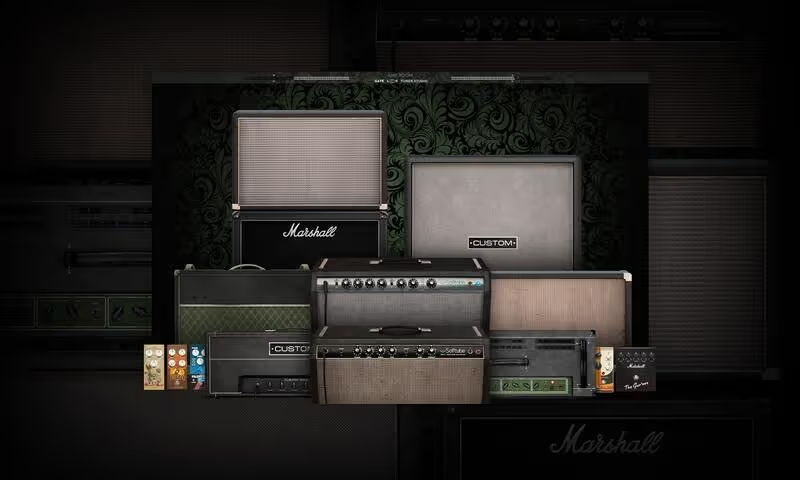
03 Softube

Amp Room: Vintage Suite

Best for Vintage Tones

Tested in our studio

The most convincing response to picking dynamics here, in the plugin with the fewest things in it.

Tested score
8.2
out of 10

How it scored

  • Clean Headroom 9.6

    Component-level modelling that cleans up off the volume knob. Best on the page.

  • Breakup Realism 9.6

    The edge of breakup is where this one separates from the list. Best here.

  • Amp Selection 4.5

    A short list, and it needs the base Amp Room host to run at all.

  • CPU Efficiency 9.2

    Very light, with low latency.

Why we picked it

Best for raw, authentic tube response because the component-level modeling algorithms react perfectly to your guitar's volume knob.

Who should skip it

Avoid if you prefer a massive collection of diverse modern amps and endless boutique digital effects.

The good

  • Incredibly authentic vintage tube response
  • Streamlined workflow without unnecessary clutter
  • Extremely low CPU and latency overhead

The bad

  • Limited built-in cabinet IR options
  • Requires the base Amp Room host plugin
  • No dedicated third-party IR loader included
Format
VST/AU/AAX
Protection
iLok
Price
$99
Why it scored that way

Softube delivers an incredibly authentic, raw tube sound that feels remarkably similar to playing through real physical hardware.

The Vintage Suite expansion for Amp Room provides a streamlined, no-nonsense workflow for dialing in classic, organic guitar tones instantly. The component-level modeling algorithms respond incredibly well to the subtle nuances of your playing, accurately capturing that coveted edge-of-breakup dynamic. I recently used this plugin exclusively to track rhythm guitars for a retro indie pop EP, and the Marshall models sat perfectly in the mix without additional equalization.

The user interface is completely utilitarian, focusing strictly on functional knobs rather than flashy, photorealistic graphics or unnecessary visual clutter. While the included cabinet IRs are generally excellent, the lack of third-party IR loading within the suite itself is somewhat frustrating. Despite that minor friction point, it remains one of the absolute best high-quality alternatives to massive, bloated pedalboard workstations.

Heard on
Jens Bogren Ola Englund Michael Wagener
Check price $99
04 Brainworx

bx_rockrack V3

Best for Curated Amplifiers

Eight amps through Neve chains and nothing else, which is either the whole point or too little plugin for the money.

Score
7.7
out of 10

How it scored

  • Clean Headroom 9.0

    The clean and crunch models are the strongest part of it.

  • Breakup Realism 8.8

    Tight and focused under the pick, with no flab to EQ out.

  • Amp Selection 3.5

    Eight amps, no effects and no third-party IR loading. Lowest here.

  • CPU Efficiency 9.4

    The lightest thing on this page. Best here.

Why we picked it

Best for immediate mixing results because the curated recording chains ensure the guitar tone sits perfectly in a dense track.

Who should skip it

Avoid if you want an all-in-one workstation with hundreds of built-in effects pedals and cabinets.

The good

  • Exceptional clean and crunch models
  • Pristine, mix-ready recording chains
  • Extremely low CPU usage

The bad

  • Very limited selection of included amps
  • No built-in modulation or delay effects
  • Cannot load third-party impulse responses
Format
VST/AU/AAX
Protection
Plugin Alliance Installation Manager
Price
$30
Why it scored that way

This plugin strictly focuses on providing a handful of absolutely pristine, mix-ready amp tones without distractions.

The bx_rockrack V3 abandons the bloated multi-effects pedalboard approach and instead focuses strictly on providing eight meticulously modeled boutique amplifiers. The included clean and crunch models are absolutely exceptional, delivering an incredibly tight, focused response that reacts perfectly to your picking dynamics. The recording chains feature impulse responses captured through high-end Neve consoles, ensuring the guitar tones fit perfectly into a professional mix immediately upon loading.

The strict, curated approach means you are severely limited in your choice of effects, as the plugin only includes a basic noise gate and EQ. If you need complex delays and modulations, you will have to supply them using external plugins in your DAW channel strip. Regardless, it is a fantastic Neural DSP alternative when you need a pristine, uncompromising rhythm guitar tone incredibly fast.

Heard on
Devin Townsend Periphery Animals As Leaders
Check price $30 (was $75)
05 Kuassa

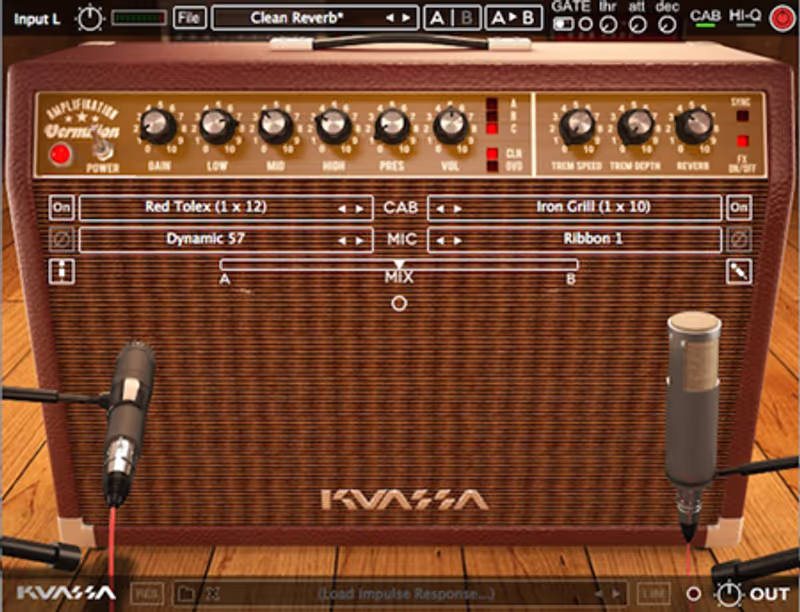
Amplifikation Vermilion

Best for Vintage Clean

One American clean amp, done properly, at a price that makes the narrowness beside the point.

Score
7.1
out of 10

How it scored

  • Clean Headroom 9.4

    Shimmer and tube sag, with the spring reverb modelled alongside it.

  • Breakup Realism 8.5

    Breaks up the way a combo does, and there is nothing beyond that.

  • Amp Selection 2.0

    One amp, no drive pedals, no metal. Lowest on the page.

  • CPU Efficiency 8.5

    Light, as a single modelled amp should be.

Why we picked it

Best for classic vintage clean tones because it flawlessly recreates the iconic, shimmering sound of legendary American combo amplifiers.

Who should skip it

Avoid if you need a versatile suite capable of delivering modern, high-gain metal distortion.

The good

  • Perfect recreation of legendary clean tones
  • Incredibly affordable price point
  • Very simple, intuitive user interface

The bad

  • Completely useless for heavy metal tones
  • No included overdrive or distortion pedals
  • Limited built-in cabinet options
Format
VST/AU/AAX
Protection
Serial Key
Price
$39
Why it scored that way

This is arguably the most accurate digital recreation of iconic, shimmering vintage American clean tones.

Amplifikation Vermilion perfectly captures the massive, shimmering clean headroom of the legendary American combo amplifiers that defined vintage rock and roll. The plugin expertly models the distinct tube sag and built-in spring reverb of the original hardware, making it absolutely ideal for surf rock or country rhythm tracks. I use this plugin constantly when mixing indie pop tracks because it provides that familiar, glassy clean tone instantly.

Because it is a highly specialized vintage emulation, it is completely useless if you are looking for aggressive, high-gain metal distortion. It also lacks any complex internal effects pedals, requiring you to use external plugins for your overdrive boosts and delay trails. However, at its incredibly low price point, it is the best specialized alternative available for guitarists seeking pure vintage clean tones.

Heard on
Unknown Mortal Orchestra Mac DeMarco Real Estate
Check price $39
06 Positive Grid

BIAS Essential

Best for Tone Matching

The only one here that will chase a reference tone for you, at the cost of an afternoon spent inside the amp.

Score
7.9
out of 10

How it scored

  • Clean Headroom 7.5

    Good, and dependent on how the matching landed.

  • Breakup Realism 8.0

    Convincing, with a cabinet stage that gives it away.

  • Amp Selection 9.0

    Tone Cloud plus amp matching means the library is effectively open-ended.

  • CPU Efficiency 7.0

    Middling, and the interface shows its age more than the CPU does.

Why we picked it

Best for matching specific tones because the built-in technology perfectly clones the sound of any physical amplifier.

Who should skip it

Avoid if you suffer from decision paralysis and just want immediate, mix-ready presets without tweaking.

The good

  • Incredible amplifier matching technology
  • Massive Tone Cloud community for presets
  • Deep internal amplifier customization

The bad

  • Deep tweaking can cause decision paralysis
  • User interface feels somewhat dated
  • Cabinet simulation is slightly artificial
Format
VST/AU/AAX
Protection
Positive Grid Account
Price
Check site
Why it scored that way

BIAS provides an unprecedented level of internal customization for guitarists obsessed with tweaking their tone.

BIAS Essential is fundamentally different from standard amp simulators because its powerful matching technology allows you to clone the tone of actual physical amplifiers flawlessly. The massive online Tone Cloud community provides instant access to thousands of user-created presets, ensuring you can find exactly what you need quickly. I find this extremely useful when I need to quickly match a specific guitar tone from a reference track during a tight mixing deadline.

The sheer depth of the internal tweaking options can easily induce severe decision paralysis, leading you to spend hours adjusting virtual tubes instead of writing music. Additionally, the user interface feels slightly dated compared to the photorealistic plugins released in more recent years. Despite this, it remains an excellent AmpliTube 5 alternative for guitarists who demand total control over every aspect of their sound.

Heard on
Stephen Carpenter Tosin Abasi Fluff
Read more →

Methodology

Who is this for

Working composers and producers who need reliability, speed, and character for professional scoring tasks.

Our testing process

Where we have tested a product, we do it in actual production scenarios, ranging from rapid sketches to commercial pitches, and we evaluate it in a dense template rather than in isolation. Where we have not, the product card says so and the assessment is drawn from specifications and documented behaviour instead.

Why you should trust us

We buy most reviewed plugins ourselves. Occasionally we receive NFRs for evaluation, but this never guarantees a review or positive verdict. We may earn commissions from links, but our editorial choices are never for sale.

Also considered

For every category, we audition the top 8 to 15 standard options, discarding any that suffer from poor scripting, slow load times, or uninspiring sampling.

Frequently Asked Questions

Do I need a special input to record guitar into an amp sim?

You need a high impedance input, usually labelled Hi-Z or instrument on an audio interface. Plugging a passive guitar into a line input loads the pickup and drains the high end before the plugin ever sees it, which no amount of modelling recovers. Active pickups and DI boxes solve the same problem in different ways.

Why does the cabinet matter more than the amp model?

Because the speaker and the microphone in front of it shape far more of the final tone than the preamp does. A cabinet impulse response is a recording of how that speaker, that microphone and that room respond, and swapping it changes the sound more than switching amps. If a patch is close but wrong, change the cabinet first.

Why does my amp sim sound fizzy?

Too much gain and no high frequency roll-off. A real speaker stops responding somewhere around 5 or 6 kilohertz, so anything above that is content a physical cabinet would never have produced. Use a proper cabinet impulse rather than the amp alone, and pull the gain back further than feels right, since sims flatter high gain settings.

Can I change the amp after recording?

Yes, as long as you record the dry DI signal alongside whatever you are monitoring. Reamping in software is simply moving the plugin onto that DI track later, which means the tone decision never has to be final at tracking. Always keep the DI, even when you are certain about the sound.

Written By

Felix Ward

Felix is an indie-folk songwriter and session guitarist who values vibe over perfection. He looks for tools that potentialize 'happy accidents' and offer immediate inspiration. If a plugin requires reading a 100-page manual, he's probably already moved on.

Related Guides

All Guides →

New reviews, no noise

Occasional email when we publish something worth your time. No daily digest, no vendor press releases.

We store only your address, never sell it, and delete it as soon as you unsubscribe. See our privacy policy.