



Tested in our studio
The widest sonic range on the page and the least suited to a vocal that has to stay a vocal.
How it scored
- Sonic Artifacts 7.0
It colours by design, so the question is taste rather than transparency.
- Workflow Speed 6.5
Deep routing and a lot of interface before the first result.
- CPU & Latency 4.5
Several engines at once is the heaviest load on this page. Lowest here.
Why we picked it
A modern alternative to vintage hardware vocoders. Best for creating dense electronic textures.
Who should skip it
Avoid if you need natural, acoustic sounding harmonies. This is purely for synthetic tones.
The good
- Massive sonic range
- Biovox is unique
- Deep MIDI control
The bad
- CPU killer
- Complex routing
- Intimidating UI
- Engine
- VST/AU/AAX
- Type
- Vocal Synthesizer
- Size
- 400 MB
- Price
- $199
Why it scored that way
A massive texturizing engine for aggressive, robotic modifications.
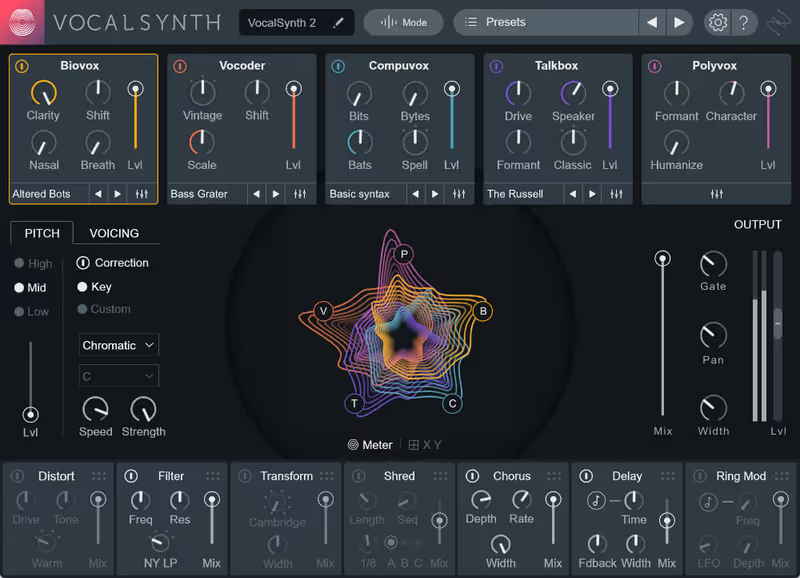
When a client asked for a robotic texture that sounded like broken neon tubes, I immediately reached for VocalSynth 2. I have used this on countless productions to transform a dry vocal into a harmonic bed that sits beautifully behind the main lead. Connecting it via MIDI allows me to play chords that dictate the harmonies. The Biovox module adds a guttural, human texture that cuts right through a dense mix.
You will need a powerful machine to run multiple instances, as the CPU hit is brutal on older rigs. In my studio, I usually bounce the results to audio immediately to save processing power. If you are comparing vocal synthesis options in a plugin review, nothing else offers this level of control over vowels and formants. It is a dense, complicated tool, but the results are undeniably modern and aggressive.
Price history and lowest recorded price
Check price $199