
7 Best Vocal Tuning Plugins for Perfect Pitch

Singers lie about their pitch accuracy, and we are left to sweep up the mess. Thank god we have the tools to fix it.

Henry Foster
By Henry Foster

Henry is a mixing engineer with a background in broadcast and post-production. He obsesses over signal flow, gain staging, and the subtle coloration of analog-modeled plugins. His reviews focus on technical precision, CPU efficiency, and UI workflow.

Finding the best vocal tuning plugins requires sifting through a mountain of algorithms claiming to sound entirely natural. Most of them sound like a dying robot the second you push the retune speed past fifty percent. For a lead vocal in a dense pop arrangement, you need a tool that operates invisibly until you deliberately command it to sound artificial.

These are the plugins I rely on when the client sends me a completely raw vocal stem and expects a polished radio hit by morning. I have learned the hard way that a cheaper alternative almost always ruins the high-frequency air of a good recording. If you want the best pitch correction available, here are the seven plugins that will actually survive a professional mix.

Quick Summary

AutoTune Vocal EQ
2. AutoTune Vocal EQ
Antares
Resonance Control
AutoTune Hybrid
3. AutoTune Hybrid
Antares
Live Tracking
reTune
4. reTune
zplane
Sample Tuning
Vocal Tuner
6. Vocal Tuner
Softube
Quick Fixes
bx_crispytuner
7. bx_crispytuner
Brainworx
Full Production
Read more →

Methodology

Who is this for

Working composers and producers who need reliability, speed, and character for professional scoring tasks.

Our testing process

We test every library in actual production scenarios—ranging from writing rapid sketches to delivering commercial pitches. We evaluate how they perform in a dense template, not just in isolation.

Why you should trust us

We buy most reviewed plugins ourselves. Occasionally we receive NFRs for evaluation, but this never guarantees a review or positive verdict. We may earn commissions from links, but our editorial choices are never for sale.

Also considered

For every category, we audition the top 8 to 15 standard options, discarding any that suffer from poor scripting, slow load times, or uninspiring sampling.

Top Picks

Antares

AutoTune Pro 11

Best For: Pop Tuning
Modes Auto and Graph
Latency Ultra-low in real-time mode
Extras Throat length modeling
Price $250

The name that defined the genre continues to dominate because it handles both invisible correction and blatant robotic abuse better than anything else.

I had a pop session last month where the lead vocalist drifted wildly out of key on the bridge, and the deadline was literally an hour away. Throwing this on the insert slot allowed me to lock the track to the scale in real time without introducing any bizarre mid-range warbling artifacts that cheaper alternatives often exhibit. The new graphical mode is less maddening than older versions, letting you draw in precise vibrato curves when a singer decides to just flat-line a held note. It respects the original formant structure brilliantly on moderate settings.

You pay a premium for the name, but the peace of mind knowing the algorithm will not randomly glitch during a critical phrase is worth the entry fee. I constantly compare other pitch correction tools against this benchmark when evaluating their worth for high-end pop production. If you rely on the absolute best tuning available to save a vocal performance, this is simply the unavoidable standard. Try mixing a modern Top 40 vocal without it and observe how quickly the producer asks you what is wrong with the chorus.

AutoTune Pro 11 by Antares - Review Verdict

AutoTune Pro 11

Our Verdict

Why we love it

Best for modern pop vocals because no other algorithm nails that aggressive retune sound as effortlessly.

Who should skip

Avoid if you only need very light, occasional pitch nudging on acoustic indie folk.

The Good
  • + The definitive modern vocal sound.
  • + Virtually artifact-free on moderate settings.
  • + Incredibly powerful graphical mode.
× The Bad
  • - Very expensive.
  • - The interface is quite dense for beginners.
  • - Subscription model puts off some users.
Famous Uses:
Modern pop lead vocals Hip hop pitch effects Precise backing vocal alignment
Antares

AutoTune Vocal EQ

Best For: Resonance Control
Bands 6 Dynamic Bands
Tracking Real-time pitch lock
Filters High and Low Pass
Price $50

This is not a traditional pitch corrector, but an EQ that physically follows the singer's wandering pitch to remove harsh resonances.

Sometimes a vocal is perfectly in tune but suffers from a nasty resonance that moves around depending on the note being sung. I encountered this recently while mixing a screechy tenor part for a theatrical trailer. Because the EQ bands in this plugin lock onto the fundamental pitch and follow it in real time, I could notch out the offending frequency without hollowing out the entire track. It behaves like a surgical scalpel that knows exactly where the patient is moving.

It actively reduces the amount of static automation you need to draw by hand, saving me hours of tedious notch riding. As an alternative to heavy multi-band compression, it keeps the vocal sounding significantly more natural and open. When you are looking for the best automated vocal EQ to sit a dynamic voice in a dense mix, this precise tool is an absolute lifesaver.

Why we love it

Best for taming moving vocal resonances because the dynamic bands track the fundamental pitch flawlessly.

Who should skip

Avoid if you just need standard pitch correction or a basic static equalizer.

The Good
  • + Tracks moving resonances perfectly.
  • + Saves hours of volume automation.
  • + Very clean sounding filters.
× The Bad
  • - Does not actually correct pitch errors.
  • - Slightly high CPU usage.
  • - Overkill for consistently recorded audio.
Famous Uses:
Taming harsh opera vocals Smoothing out breathy female leads Dynamic plosive control
Antares

AutoTune Hybrid

Best For: Live Tracking
Platform AAX DSP only
Latency Near zero
Algorithm Core Auto-Tune engine
Price $200

For engineers who need zero latency while recording high-end pop vocals directly into the DAW.

Singers almost always perform better when they can hear exactly how the tuned vocal will sit against the music in their headphones. This DSP-optimized version allowed me to run an incredibly heavy tracking session without a single complaint about latency from the booth. You get the exact same algorithm as the flagship version, but it offloads the heavy processing to your DSP hardware, ensuring the system remains completely stable under pressure.

Unless you are actively running a professional studio with Avid Carbon or HDX hardware, this specific version is largely useless to you. However, for those of us deeply invested in that ecosystem, it functions as the best zero-latency tuning solution on the market. It eliminates the clunky workaround of printing tuned stems during a fast-paced writing camp.

AutoTune Hybrid by Antares - Review Verdict

AutoTune Hybrid

Our Verdict

Why we love it

Best for zero-latency studio tracking because it leverages external DSP hardware to remove native CPU strain.

Who should skip

Avoid if you do not own compatible Avid DSP hardware.

The Good
  • + Incredible zero latency performance.
  • + Does not strain the native CPU.
  • + Industry standard tone.
× The Bad
  • - Strictly requires specific hardware.
  • - Does not include the Graph mode.
  • - Very situational use case.
Famous Uses:
Recording booths Pro Tools HDX sessions Live broadcast tuning
zplane

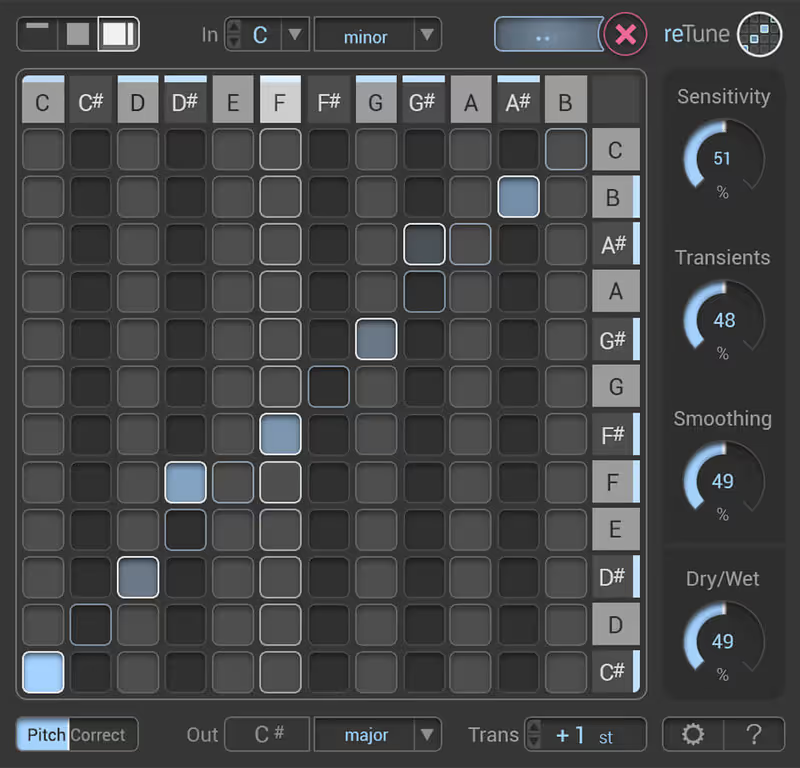
reTune

Best For: Sample Tuning
Polyphony Full chord recognition
Mapping Scale to Scale
Latency Moderate
Price $155

This breaks the mold of standard tuning by allowing you to radically remap the pitch of entirely polyphonic loops and samples.

I recently had to force a complex acoustic guitar sample to fit the dark harmonic minor scale of a cinematic thriller cue. Standard pitch correction completely choked on the polyphony, generating a garbled mess of digital artifacts. Throwing this polyphonic mapping tool onto the track allowed me to snap the offending major third notes into the correct minor key without destroying the strumming transients. The algorithm is remarkably robust when analyzing dense harmonic information in real time.

It is not the right choice for subtle surgical vocal tweaks, as the interface is geared toward global scale transposition rather than micro-timing adjustments. If you operate primarily with sampled loops, it is undoubtedly the best polyphonic re-pitching tool available. It acts as a phenomenal creative alternative to simple pitch-shifting algorithms that ruin the character of the original audio.

reTune by zplane - Review Verdict

reTune

Our Verdict

Why we love it

Best for tuning polyphonic samples because the algorithm can map complex chords to new scales in real time.

Who should skip

Avoid if you need surgical, note-by-note graphical editing for a lead vocal.

The Good
  • + Handles polyphonic audio beautifully.
  • + Great for sampling workflows.
  • + Intuitive scale mapping matrix.
× The Bad
  • - Not designed for precise vocal graphing.
  • - Can smear transients on extreme shifts.
  • - Interface looks slightly analytical.
Famous Uses:
Remapping guitar loops Fixing out-of-tune sample libraries Creative chord manipulation
Waves

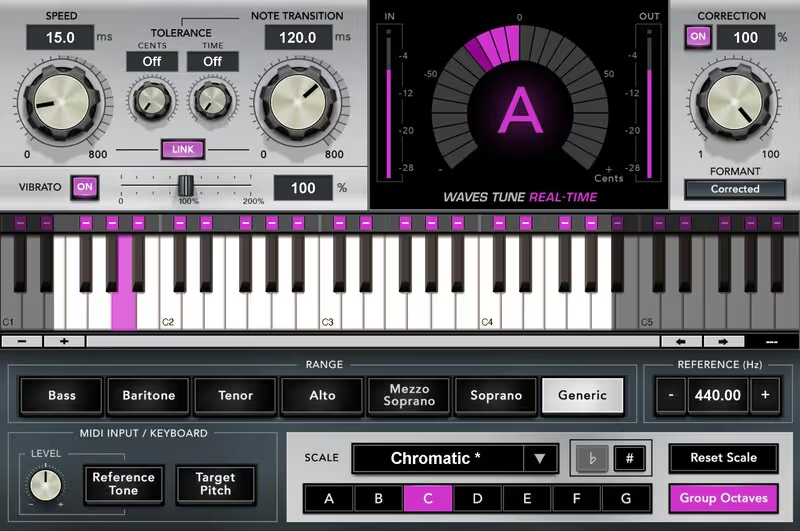
Tune Real-Time

Best For: Live Vocals
Latency Ultra-low
Controls Speed, Transition, Tolerance
Formant Correction included
Price $199

Waves delivers a highly efficient, set-and-forget tuning plugin that excels during fast tracking sessions and live broadcasts.

When producing a live-streamed concert event recently, I needed a tuning solution that would stay completely invisible while handling a very dynamic stage performance. This plugin proved incredibly stable, clamping down on flat notes gently without inducing that sudden robotic snap that ruins acoustic performances. The note transition controls are surprisingly musical, allowing the singer's natural vibrato to pass through largely unaffected by the pitch engine.

It completely lacks the deep graphical editing usually required for microscopic studio perfection. It forces you to heavily trust the internal detection engine, which thankfully behaves quite predictably on the vast majority of challenging acoustic sources. For independent artists operating on a strict budget, it serves as the absolute best affordable real-time tuning alternative for touring gigging musicians and bedroom producers alike.

Tune Real-Time by Waves - Review Verdict

Tune Real-Time

Our Verdict

Why we love it

Best for live performance and rough mixes because of its incredibly low latency and stable automatic tracking.

Who should skip

Avoid if you demand absolute surgical precision on every single syllable.

The Good
  • + Excellent low-latency performance.
  • + Very affordable during sales.
  • + Maintains natural vibrato well.
× The Bad
  • - No graphical editing mode.
  • - Can struggle with very raspy vocals.
  • - Not ideal for extreme robotic effects.
Famous Uses:
Live vocal monitoring Quick rough mixes Podcast sweetening
Softube

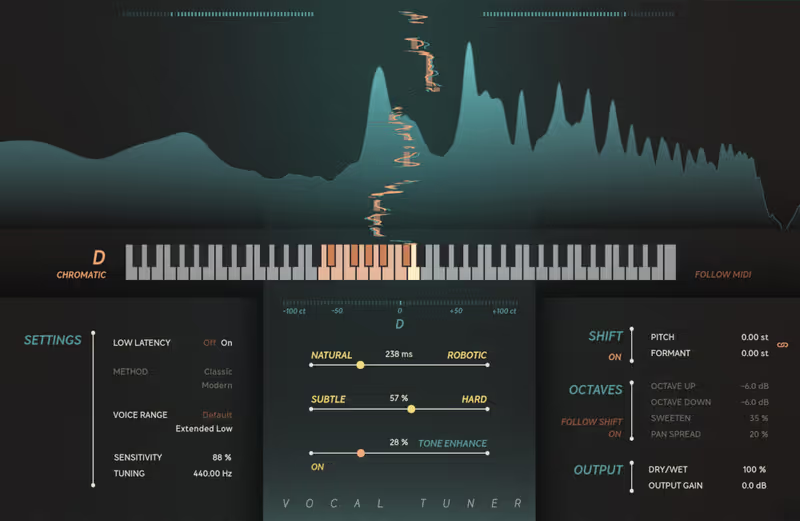
Vocal Tuner

Best For: Quick Fixes
Interface Hardware style knobs
Algorithm Transparent correction
Meters Simple pitch deviation
Price $199

This plugin strips away the intimidating graphs and menus, offering a remarkably fast path to a well-tuned vocal.

I grew tired of staring at complicated pitch graphs during a marathon mixing session for a punk band. Slapping this simple tool onto the backing vocal bus immediately fixed the sour harmonies without requiring me to draw a single line. The interface is designed like a hardware unit, forcing you to use your ears to dial in the correction speed rather than relying on visual grids. The resulting sound is thick, warm, and highly musical.

The lack of deep parameters means you cannot fix a truly disastrous vocal performance with this alone. However, for the majority of competent singers who just need a gentle nudge, it arguably represents the best fast-workflow tuning plugin around. It is a fantastic alternative for producers who despise the tedious nature of vocal editing.

Vocal Tuner by Softube - Review Verdict

Vocal Tuner

Our Verdict

Why we love it

Best for rapid workflow mixing because the simple knob interface forces you to mix with your ears.

Who should skip

Avoid if you are dealing with a completely tone-deaf singer requiring heavy editing.

The Good
  • + Incredibly fast to operate.
  • + Sounds very natural on moderate settings.
  • + Visually appealing and simple.
× The Bad
  • - Lacks detailed graphical editing.
  • - No advanced formant controls.
  • - Struggles with extreme pitch glides.
Famous Uses:
Backing vocal busses Fast demo production Indie rock vocals
Brainworx

bx_crispytuner

Best For: Full Production
Modes Live, Advanced, Graphical
Extras Includes CrispyScale finder
Formant Advanced preservation
Price $31

Brainworx built a highly capable, modern tuning suite that aggressively challenges the established industry giants.

I was initially skeptical of learning a new graphical tuning interface, but a demanding client insisted on using this specific processor. The included scale finder tool accurately mapped out the complex vocal runs, saving me the trouble of programming the key signature manually. The graphical mode is surprisingly fluid, allowing me to isolate and flatten extreme pitch drifts without degrading the presence of the vocal recording.

The algorithm has a slightly different sonic signature when pushed hard, sounding a bit more aggressive than the traditional standard. If you want a comprehensive suite that handles everything from transparent adjustments to hard synth-pop effects, this is the best full-featured alternative available entirely outside the subscription model. It completely justifies its place in any modern mixing template.

bx_crispytuner by Brainworx - Review Verdict

bx_crispytuner

Our Verdict

Why we love it

Best for comprehensive vocal production because it includes an excellent scale finder and fluid graphical editing.

Who should skip

Avoid if you are already deeply entrenched in an existing graphical tuning workflow.

The Good
  • + Excellent graphical editing workflow.
  • + Scale finder is highly accurate.
  • + No subscription required.
× The Bad
  • - Slightly aggressive sound when pushed.
  • - GUI takes time to learn.
  • - High CPU usage in graph mode.
Famous Uses:
Modern pop and trap production Detailed vocal comping Creative pitch manipulation
Written By

Henry Foster

Henry is a mixing engineer with a background in broadcast and post-production. He obsesses over signal flow, gain staging, and the subtle coloration of analog-modeled plugins. His reviews focus on technical precision, CPU efficiency, and UI workflow.