
Do This Now
- 1 Start with Discover, which is free and downloads at about 240MB. It has 34 instruments and 47 techniques, enough to sketch a full orchestral cue and learn how the library behaves.
- 2 Buy Core when Discover's techniques run out. It has every section, 344 techniques including legato on each melodic instrument, and one finished mix signal in about 28GB.
- 3 Buy Professional only for the microphones. It adds 20 signals, including close, tree, ambient and spill mics plus an Atmos mix, which matters when you deliver stems or mix the orchestra yourself.
- 4 Check your drive before buying Professional. It downloads 630GB and needs about 632GB free during installation.
- 5 Upgrade instead of buying twice. Spitfire charges the price difference between editions, and projects open in any edition because the plugin switches mode.
- 6 Do not confuse it with Spitfire Symphony Orchestra, a different library recorded at AIR Lyndhurst that runs in Kontakt Player.
Playing connects you to YouTube, which may set cookies.
BBC Symphony Orchestra is Spitfire Audio's orchestral library recorded with the BBC Symphony Orchestra at its home, Maida Vale Studios in London. It is sold in three editions, from free to several hundred pounds, and they share the same recordings. What changes is how many instruments and techniques you get, how many microphones, and how much drive space it takes.
Pick the Edition by the Job, Not the Price
Each edition contains the one below it and adds one thing. Discover gives you a playable orchestra to learn on. Core adds the full set of instruments and techniques. Professional adds the microphones.
So the decision is three questions. Are you starting out or sketching? Discover. Do you want a complete orchestra for finished mockups? Core. Do you deliver stems, mix in surround or need to shape the room yourself? Professional.
- Discover
- Free
- Core
- £399 list
- Professional
- £899 list
- Upgrade
- Pay the difference
Those are Spitfire's UK list prices. US prices launched at $449 for Core and $999 for the full library, and Spitfire runs regular sales, so check the current price in your region before buying.
| Discover | Core | Professional | |
|---|---|---|---|
| Price | Free | £399 | £899 |
| Instruments | 34 | 44 | 57, with soloists |
| Techniques | 47 | 344 | 468 |
| Signals | 1 mix | 1 mix | 20 mics and mixes |
| Download | About 240MB | 28.2GB | 630.3GB |
Know What Discover Does, and Where It Stops
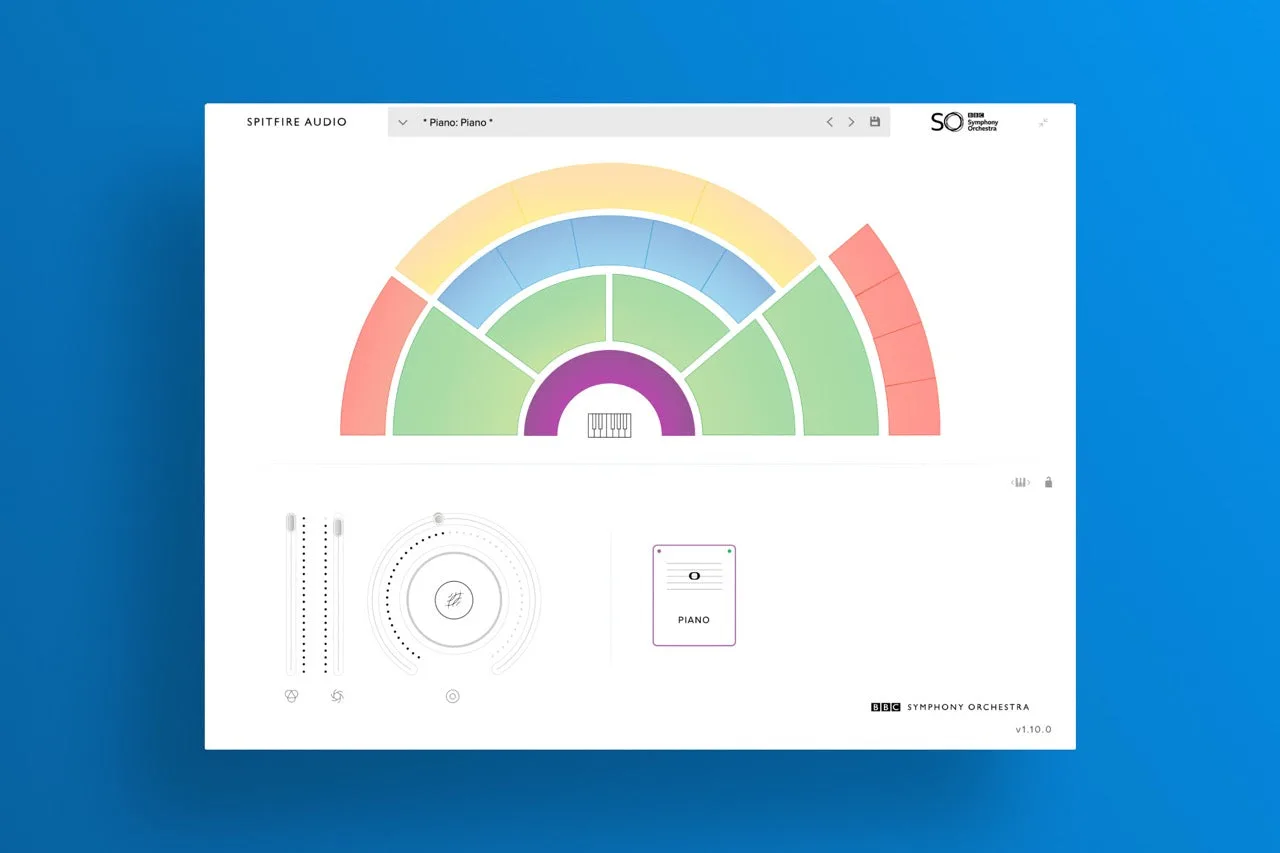
Discover shows the orchestra as a seating plan. Click a section to load it. The Core and Professional plugins use the same controls with more techniques underneath. Image: Spitfire Audio.
Discover gives you 34 instruments and 47 techniques across strings, woodwinds, brass and percussion, with one mixed signal. Spitfire says it uses the same recording process as the larger editions and that upgrading unlocks further signals, controls and sampling depth. In practice that means fewer articulations per instrument and a lighter sample set behind each one.
For a composer starting out, that is the right trade. It installs in minutes, loads quickly on a laptop and teaches you how a sampled orchestra responds to the mod wheel and expression, which is the skill every larger library assumes. The MIDI CC guide covers those controllers, and the instrument ranges guide covers what each instrument can play.
Where it stops is detail. With few techniques per instrument, a cue that needs legato lines, varied short notes and string effects runs out of options quickly. When you start writing around the library's gaps rather than around the music, it is time for Core.
Get Core for Finished Mockups
Core is the edition most composers end up with. It has 44 instruments, 344 techniques including a legato for every melodic instrument, and all the sections Professional has, in a 28.2GB download. Spitfire describes it as the same recording quality as Professional in a more streamlined package.
Playing connects you to YouTube, which may set cookies.
The limit is the single signal. Core plays a finished mix of the room, balanced by Spitfire's engineers, rather than the individual microphones. For a mockup that is usually an advantage, because the orchestra arrives already sounding like a hall. It becomes a limit when you need to make the strings drier, push the brass further back or deliver separate stems with their own room sound.
Spitfire's latest update added about 1.8GB to Core, with extra brass performances, muted brass techniques and updated legatos that handle fast runs and shorts better.
Pay for Professional Only for the Microphones
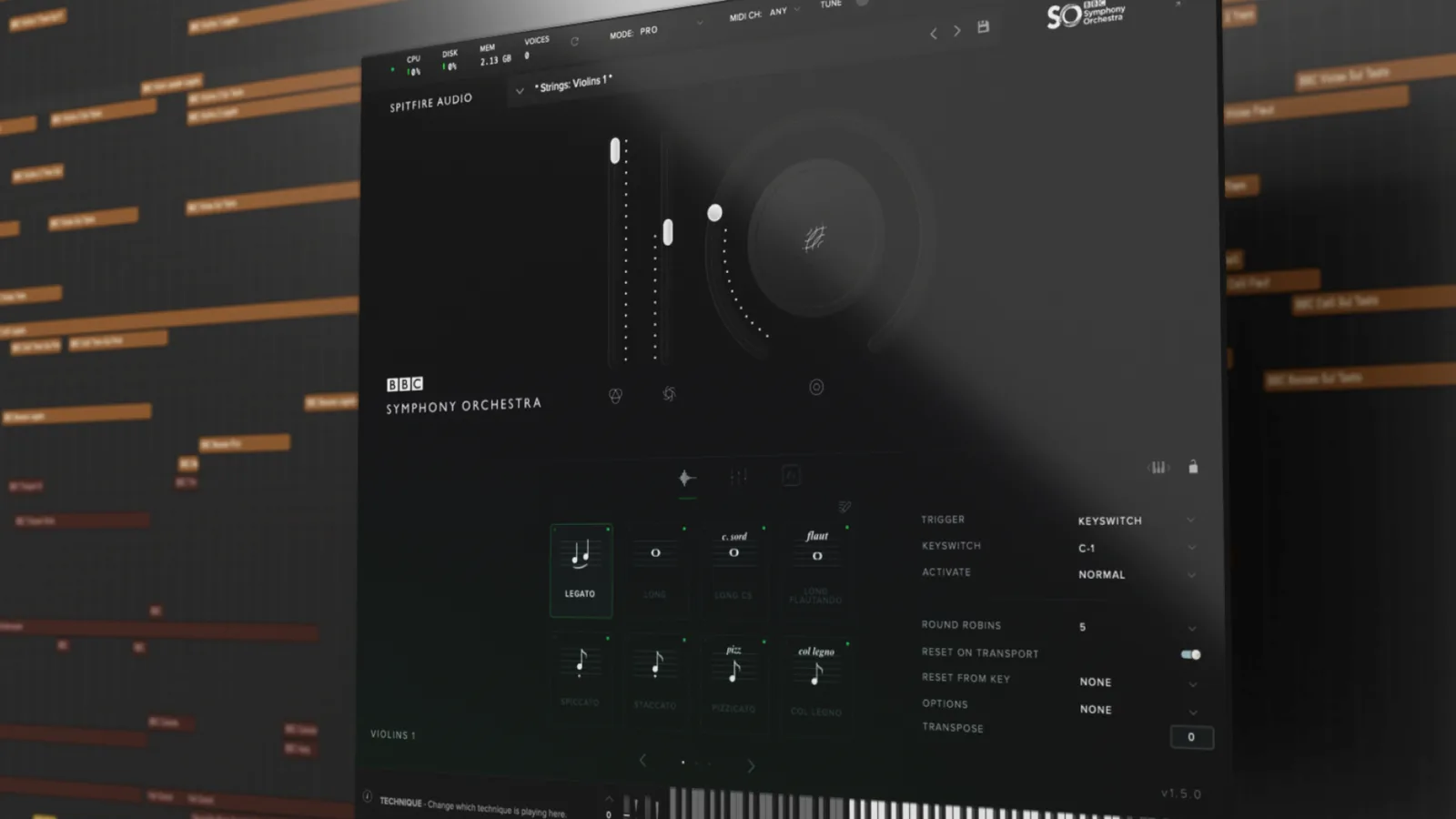
Professional with Violins 1 loaded, showing the technique cards and their keyswitch settings. Image: Spitfire Audio.
Professional adds two things to Core. The first is content: 468 techniques, 45 legatos including Spitfire's Extended Legatos, and soloists. The second, and the reason most people buy it, is 20 signals. These include eleven microphone positions (Mono, Close, Tree, Out, Ambient, Balcony, Leader, Stereo, Mids, Sides and Close Wide Pan), five spill microphones, two stereo mixes and an Atmos mix with front and rear signals.
That is a mixing tool. With separate close and room microphones you decide how wet each section sounds, match the library to other libraries in the same template, and deliver stems that a dubbing mixer can rebalance. The Atmos signals matter if you deliver in immersive formats. If none of that is part of your work, Core's mix gives you most of the sound for a fraction of the size.
The size is the other cost. Professional downloads 630.3GB and needs about 632GB free during installation, so it usually wants its own fast drive. The latest update, version 1.14.0 in October 2026, added about 36GB, including a cimbasso, muted brass and the extended legatos.
Check Your System Before You Buy
All three editions run in Spitfire's own plugin, not in Kontakt, and install through the Spitfire Audio App. The plugin comes in AU, VST2, VST3 and AAX formats on macOS 11 or later and on 64-bit Windows 10 or 11, Intel or Apple Silicon.
Spitfire lists a quad-core 2.8GHz processor with 8GB of RAM as the minimum and recommends a six-core processor with 16GB. Those figures describe loading the library, not a full template. A complete orchestra with several Professional microphones per instrument will use far more memory, and that is where a template plan and a fast SSD matter.
Don't Confuse It With Spitfire Symphony Orchestra
Spitfire sells a second, separate orchestra with a similar name. Spitfire Symphony Orchestra was recorded at AIR Studios' Lyndhurst Hall with 123 players, runs in Kontakt Player, and costs £499 for a library of about 368GB. In November 2025 Spitfire also released a free Spitfire Symphony Orchestra Discover, with 44 instruments in Kontakt Player, which is a different download from BBC Symphony Orchestra Discover.
The two orchestras sound different because the halls and the recording approach differ, and they run in different players. If a tutorial or a template asks for one, the other will not load its patches.
Upgrade Rather Than Buy Twice
Spitfire prices an upgrade between editions at the difference between them at the point of purchase. Starting with Discover and moving to Core, or with Core and moving to Professional, costs no more than buying the larger edition first. Logged-in owners see their upgrade price when they add an edition to the cart.
Projects survive the move. The plugin switches between Discover, Core and Professional modes, so a session written on Discover opens on a Core or Professional system, and the reverse works with the larger edition's extra content missing.
If you are weighing BBC Symphony Orchestra against other complete orchestras, the BBC Symphony Orchestra alternatives roundup compares the main options, and the free orchestral VSTs roundup covers Discover's free competitors.
Related Articles
Best BBC Symphony Orchestra Alternatives
Hollywood Orchestra Opus, EastWest Symphonic Orchestra, UJAM Symphonic Elements and two more BBC Symphony Orchestra alternatives, compared on coherence.
The Best Cinematic String Libraries for 2026
Cinematic Studio Strings, Hollywood Strings 2, Berlin Strings, Spitfire Chamber Strings and three more string libraries compared on legato, realism and RAM.
Best Free Orchestral VSTs for Composers on a Budget
The free orchestral libraries actually worth your disk space, and an honest account of where each one stops being enough.
Frequently Asked Questions
Is BBC Symphony Orchestra Discover really free?
Yes. Discover launched in 2020 at a small price or free after a questionnaire, and Spitfire has since made it free for everyone. You download it through the Spitfire Audio App, and owners of Core or Professional receive it automatically.
What is the difference between BBC Symphony Orchestra Core and Professional?
Spitfire describes Core as the same recordings in a streamlined package. Core has 44 instruments and 344 techniques with one mix signal. Professional has 468 techniques, adds soloists and extended legatos, and gives you 20 separate microphone and mix signals, at a 630GB download instead of 28GB.
Can I upgrade from Discover or Core later?
Yes. Spitfire prices an upgrade at the difference between the two editions at the time you buy, so starting small costs nothing extra. Projects keep working after an upgrade because the plugin switches between Discover, Core and Professional modes.
Does BBC Symphony Orchestra need Kontakt?
No. It runs in Spitfire's own plugin, installed and authorised through the Spitfire Audio App, in AU, VST2, VST3 and AAX formats. Spitfire Symphony Orchestra, a different library, is the one that runs in Kontakt Player.
How much RAM does BBC Symphony Orchestra need?
Spitfire lists 8GB of RAM and a quad-core 2.8GHz processor as the minimum for every edition, and recommends 16GB with a six-core processor. A full orchestral template with several Professional microphones loaded will want more than the minimum.
More Guides
All Guides →Which Komplete 26 Edition Do You Need? Standard, Ultimate or Collector's Edition
Komplete 26 comes in Standard, Ultimate and Collector's Edition, from $549 to $1,949. What each one adds for a composer, which edition has the orchestra, how much disk it needs, and how to upgrade without paying twice.
Writing for French Horn Without Making It Unplayable
The horn is the most misjudged instrument in the orchestra. Real range against sampled range, why four horns in unison is the default, and the register that ruins takes.
Divisi Strings Explained, and Why Your Chords Sound Like a Wall
Sixteen violins playing one line is a section. Sixteen violins split four ways is four thin sections. When divisi helps, when it costs you, and how to fake it in samples.
New reviews, no noise
Occasional email when we publish something worth your time. No daily digest, no vendor press releases.
We store only your address, never sell it, and delete it as soon as you unsubscribe. See our privacy policy.

Louis Raveton
Louis works across immersive scores (Venice Biennale, LVMH) and animation (Canal+), while producing Downtempo and Electro-Dub as Monsieur Shwill and Flagada. He treats his sample drive like a record collection, constantly hunting for the perfect 'imperfect' texture