u-he · Review

u-he Diva Review

A full review of Diva: why the mix-and-match architecture beats the hardware it models, what Apple Silicon changed, and whether the CPU cost still bites.

Verdict

Buy it. Diva is the best analog emulation available and the mix-and-match design does things no hardware can. On Apple Silicon the old CPU objection has largely evaporated. On Windows, budget for it.

ModWheel is reader-supported. When you buy through links on this page we may earn an affiliate commission, at no extra cost to you. This never influences which products we recommend, read our testing methodology.

01 u-he

Diva

Best for Everything

Tested in our studio

#4 bestseller at Plugin Boutique

Still the best-sounding virtual analogue there is, and the CPU bill is the honest price of that filter modelling.

Tested score
7.6
out of 10

How it scored

  • Sound Design Range 9.2

    Mix-and-match modules cover three manufacturers convincingly.

  • Preset Quality 8.5

    Strong factory bank that shows the engine off properly.

  • CPU Footprint 4.5

    Notoriously hungry, and Divine mode is punishing. Worst here.

  • Modulation Depth 8.0

    Deep, though the routing takes a while to internalise.

Why we picked it

The absolute best choice for producers who want one synth to rule them all. It covers Moog, Roland, and Korg styles flawlessly.

Who should skip it

Avoid if you have an older computer. Diva is notoriously hungry for CPU cycles, especially in 'Divine' mode.

The good

  • Unmatched sound quality
  • Mix-and-match modules
  • Beautiful UI

The bad

  • CPU heavy
  • Complex routing
  • Interface is small
Engine
VST/AU/AAX
Type
Virtual Analog
Size
200 MB
Price
$179
Why it scored that way

Diva stands for 'Dinosaur Impersonating Virtual Analogue'.

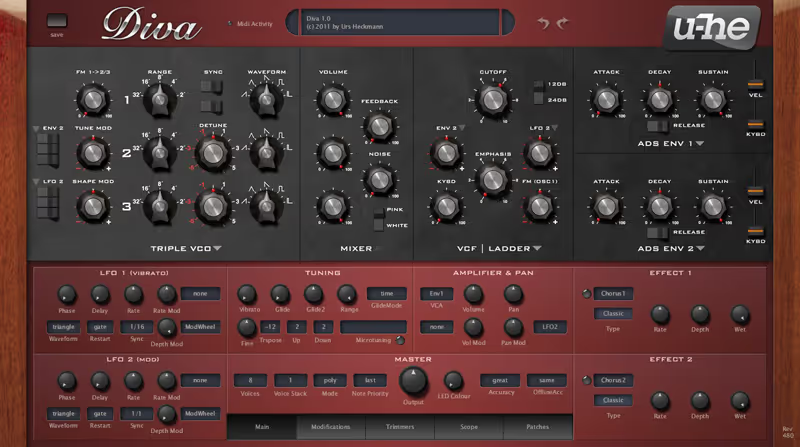
Diva is widely considered the best sounding analog emulation on the market, and it has replaced almost every hardware synth I own for studio work. Its unique "Mix-and-Match" design allows me to route a Moog oscillator through a Roland Juno filter, creating hybrid textures that simply aren't possible on physical gear. I recently used the "Divine" mode on a film score to create a slowly evolving pad, and the zero-delay feedback filters handled the rapid modulation without a single digital artifact or stair-stepping effect.

It is famously CPU-hungry, but that's the price of perfection. I treat it like a real instrument. I record the audio rather than keeping it live as MIDI. The "Trance" envelope model is particularly snappy-I used it to program a rolling bassline that felt indistinguishable from a Minimoog. If I could only take one plugin to a desert island, it would be Diva, simply because it can be any synth I need it to be.

Playing connects you to YouTube, which may set cookies.
Heard on
Hans Zimmer Techno Production Film Scores
Check price $179

Diva has been the answer to “best analog emulation” for long enough that the question is now whether the CPU cost is still worth paying. On Apple Silicon, that answer changed.

Mix and match is the real feature

Diva models several classic circuits, but the design decision that matters is that you can combine them. Route a Moog-style oscillator through a Roland Juno filter and you get a hybrid that no physical instrument can produce, because on real gear those parts are soldered together.

The zero-delay feedback filters hold up under rapid modulation without the stair-stepping artifacts that give cheaper emulations away. On slow evolving pads, which is where emulations usually fall apart, it stays clean.

What Apple Silicon changed

Diva was the plugin that made people freeze tracks. Running one instance in Divine mode used to be a budgeting decision.

The ARM optimisation genuinely fixed this. Multiple polyphonic instances at full quality now run on a MacBook Air without the machine labouring. That is not a marginal improvement, it changes whether Diva is usable across a whole arrangement rather than on one hero part.

Where it still costs you

On Windows, the old caveat stands. Diva remains hungry, Divine mode especially, and the efficiency gain is specific to the ARM optimisation rather than a general rewrite.

The workflow answer has always been to treat it like a real instrument: record the audio, free the CPU, move on. That is still sound advice on Intel and PC.

Specs

FormatVST / AU / AAX
Apple SiliconNative, heavily optimised
FiltersZero-delay feedback

Who should buy it

Anyone who wants analog character without maintaining hardware, and particularly anyone on Apple Silicon, where the historic objection no longer applies.

If you are on an older Windows machine and need many simultaneous instances, be realistic about what your CPU will take.

Written By

Ewan Clarke

Ewan is a sound designer whose patches have appeared in major wavetable synths and cinematic scoring libraries. A self-confessed modular addict, he bridges the gap between West Coast experimentation and pop-ready polish. He believes every preset should tell a story.

Related Guides

All Guides →

New reviews, no noise

Occasional email when we publish something worth your time. No daily digest, no vendor press releases.

We store only your address, never sell it, and delete it as soon as you unsubscribe. See our privacy policy.