The fastest way to make a sterile track sound expensive, with no way to aim it at the band that needs it.
How it scored
- Sound Quality 9.0
Five analog models, all convincing, none of them subtle by accident.
- Workflow Speed 9.3
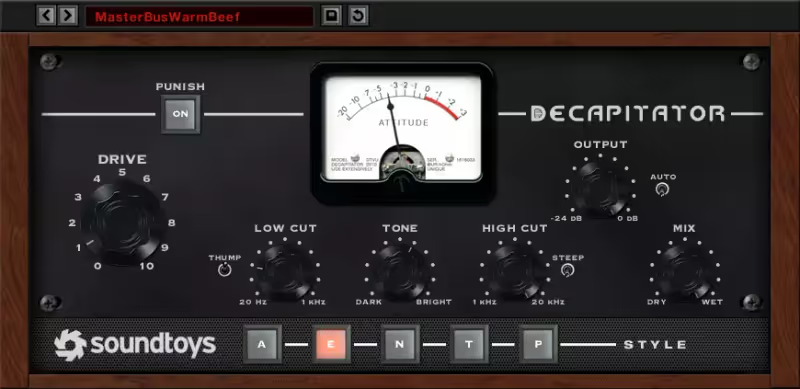
Drive, tone, mix, Punish. You are done in seconds.
- CPU Footprint 6.5
Spikes under oversampling, which is where you want it running.
- Metering & Control 3.0
A drive meter and nothing else. Lowest here.
Why we picked it
Best for adding character, warmth, and grit to sterile digital tracks.
Who should skip it
Skip this if you want pristine, glassy clean tones.
The good
- Sounds expensive
- Simple interface
- Versatile tones
The bad
- No multi-band
- Fixed GUI on older versions
- CPU spikes
- Engine
- VST/AU/AAX
- Type
- Saturator
- Size
- Plugin
- Price
- $199
Why it scored that way
Make digital sound analog.
My Experience: Digital recording is often too clean and sterile. Decapitator fixes that instantly. It models the behavior of driving high-end analog hardware inputs into the red. I use it on drums to shave off transients and add punch, on bass to add growl and upper harmonics, and on vocals to add "hair" and attitude. It sits the sound in the mix instantly, giving it a perceived loudness and weight that EQ alone cannot achieve.
Deeper Look: The "Punish" button is famous for extreme distortion, but the real magic is in the subtlety. Using the "E" style (Chandler) with just a touch of Drive brings disparate elements together beautifully. It acts as a glue. The Mix knob is essential for parallel processing, allowing you to blend the destroyed signal with the clean one without complicated routing setups. It is the sound of "expensive."
Playing connects you to YouTube, which may set cookies.