
Black Friday 2026260 deals tracked, up to 97% off See the deals →

5 Best LUFS Meter Plugins for Loudness and Delivery (2026)

A cue rejected for loudness costs you a day and some credibility, and your DAW's own meter will not tell you it is coming. These are the LUFS meters engineers name when the delivery spec is somebody else's problem to enforce, starting with a free one that is good enough for most of you.

Henry Foster
By Henry Foster Mixing Engineer & Studio Tech

ModWheel is reader-supported. When you buy through links on this page we may earn an affiliate commission, at no extra cost to you. This never influences which products we recommend, read our testing methodology.

Prices come from the store's own feed and were last checked 23 November 2026. We don't issue discount codes — the price you see is the store's own.

Pick one in 10 seconds

Short version

Compare all 5

Insight 2
1. Insight 2 Best Overall Delivery Metering iZotope
8.4
Type
Analysis suite
Covers
Loudness, spectrum, imaging, surround
Price position
High
LEVELS
2. LEVELS Master Checks Mastering The Mix
8.0
Type
Loudness and mix-check meter
Covers
LUFS, true peak, stereo, dynamics, bass
Price position
Mid
$39 $80 View price
DRMeter MkII
3. DRMeter MkII Dynamic Range MAAT
7.0
Type
Dynamic range meter
Covers
Loudness and dynamic range
Price position
Mid
Youlean Loudness Meter 2
4. Youlean Loudness Meter 2 Best Free Loudness Delivery Youlean
8.6
Type
LUFS meter
Covers
Loudness, LRA, dynamics, true peak
Price position
Free, Pro low
Free, Pro $49 Our verdict
5. VisLM Broadcast Compliance NUGEN Audio
7.5
Type
Loudness and compliance meter
Covers
Loudness, true peak, history
Price position
Highest here

A LUFS meter measures loudness the way delivery specs and streaming services do, over time and weighted for how the ear hears, rather than as the sample peak your channel meter shows. That makes it the one purchase in this list that can pay for itself in a single avoided redelivery. Start free. Youlean's meter reads integrated, short-term and momentary loudness, loudness range and true peak to the ITU standard, and many composers never need more. Pay when you need breadth (spectrum, imaging and surround in one window), compliance (presets and logging for a broadcaster's spec) or mix checks that go beyond loudness. These scores are synthesised from engineer reports, user reviews and magazine reviews rather than from sessions in our studio, and every card names the sources behind it. We may earn a commission on links, which never decides the order or the verdicts.

Top Picks

01 iZotope Best Overall

Insight 2

8.4 / 10 Community score

Best for Delivery Metering

Scored from 7 user reports, not tested by us

How this score was reached

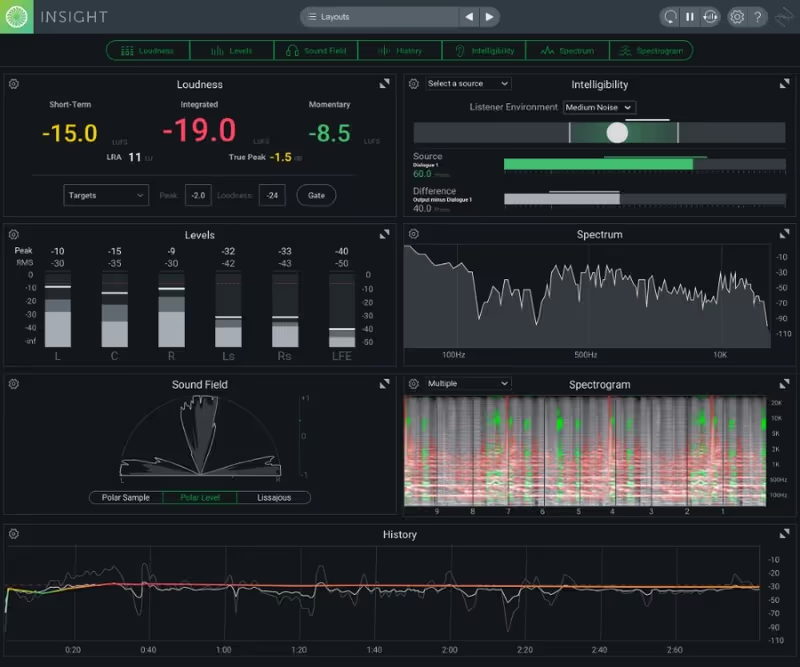
What users agree on. Engineers describe it as working more seamlessly and intuitively than the alternatives, single out the 3D overlays as easier to read than overlapping spectrographs, and report its LKFS readings matching professional standards to within a tenth of a decibel.

The recurring complaint. The price is the recurring objection, with more than one engineer saying they would not buy it on its own at full asking price even knowing what it does, and would only take it as part of a bundle.

Synthesised from 7 user reports (Gearspace and VI-Control metering threads from the Insight 2 release onward). Nobody here ran this product.

The most complete option here, and one to buy inside a bundle rather than alone.
How it scored

  • Accuracy against standards Best in list 9.5

    Reported as matching professional readings within 0.1dB.

  • Readability 9.0

    The 3D overlays are the most praised element.

  • Breadth of tools Best in list 9.0

    Loudness, spectrum, imaging and surround in one place.

  • Value bought alone 6.0

    Engineers repeatedly say bundle it rather than buy it.

Why we picked it

Composers delivering to varied specs who want loudness, spectrum and imaging answered by one plugin.

Who should skip it

You only need integrated LUFS and true peak, where a free meter does the same job.

The good

  • Readings match professional standards
  • 3D overlays are genuinely legible
  • Covers far more than loudness
  • Delivery presets included

The bad

  • Hard to justify at full price
  • Overkill for simple delivery
  • Usually cheaper in a bundle
  • More display than most need
Type
Analysis suite
Covers
Loudness, spectrum, imaging, surround
Price position
High
Why it scored that way · 1 min read The meter that answers every delivery question in one window. It is priced as though it knows that.

The meter that answers every delivery question in one window. It is priced as though it knows that.

Insight is the meter engineers name first in these threads, and the praise is about clarity rather than novelty. It is described as working more seamlessly and intuitively than the alternatives, with the 3D overlays picked out specifically as easier to read than trying to interpret overlapping spectrographs. One engineer reports its LKFS readings matching professional industry references to within a tenth of a decibel, which is the only accuracy claim that matters on a delivery meter.

The objection is consistent and it is about money rather than function. Several engineers state they would not buy it standalone at the full asking price even knowing exactly what it does, and would only acquire it as part of a larger bundle. Given how often iZotope bundles discount, that is practical advice rather than a complaint about quality.

The other honest qualification is scope. A composer who needs integrated LUFS and a true peak ceiling for delivery is buying a great deal of analysis they will never open, and a free meter answers that narrower question. Buy this when the spectrum, imaging and surround readouts are things you actually use, and it earns its place immediately.
Check price $199
02 Mastering The Mix

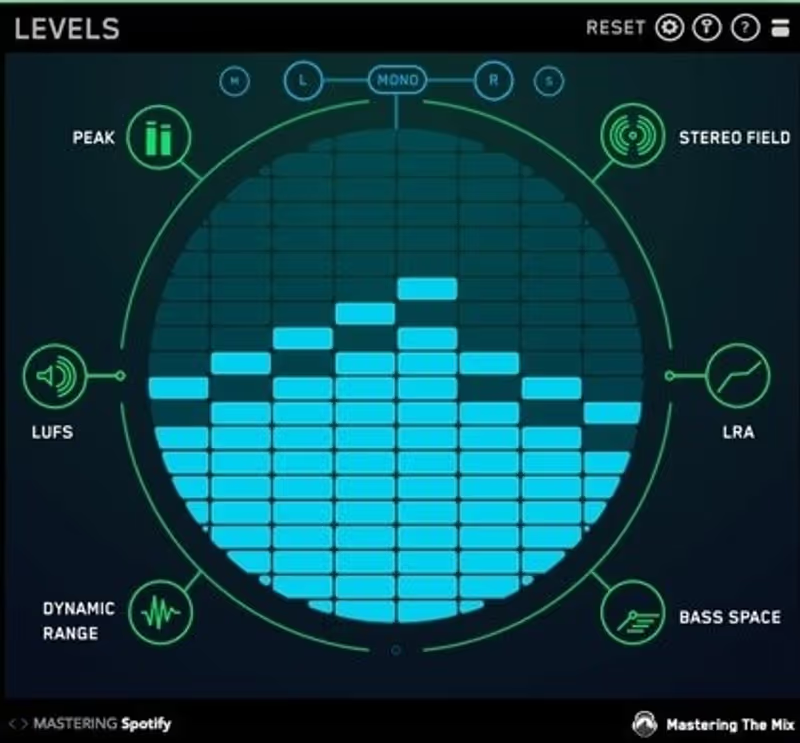
LEVELS

8.0 / 10 Community score

Best for Master Checks

Scored from 6 user reports, not tested by us

How this score was reached

What users agree on. Praised as a fast, simple check that turns red or green on headroom, loudness, stereo field, dynamic range and low end, and as a good teacher. One user credits it with showing them they were over-compressing and under-using EQ.

The recurring complaint. Reviewers judged it a partial success, and users call the price high for a metering plugin. Its checks are built around modern music masters, so its idea of a good dynamic range is not a film delivery spec.

Synthesised from 6 user reports (Magazine reviews from the 2016 release, plus KVR user reviews to 2022). Nobody here ran this product.

Good for composers releasing music to streaming who want loudness and quick mix checks in one plugin, and less useful for picture delivery.

How it scored

  • Accuracy against standards 8.5

    EBU R128 loudness and true peak, not disputed.

  • Readability 9.0

    Red and green checks with an explanation for each.

  • Breadth of tools 7.5

    Loudness, stereo, dynamics and low end in one view.

  • Value bought alone 7.0

    Priced above what users expect of a meter.

Why we picked it

Composers releasing albums or singles to streaming who want a LUFS reading and a quick check of their master's stereo field, dynamics and low end.

Who should skip it

You deliver to picture and only need loudness and true peak, where a free meter answers the question.

The good

  • Plain-language mix checks
  • Streaming presets included
  • Useful as a learning tool
  • Fast to read at a glance

The bad

  • Price high for a meter
  • Checks assume modern music masters
  • Less suited to picture delivery
  • Small interface, per early reviews
Type
Loudness and mix-check meter
Covers
LUFS, true peak, stereo, dynamics, bass
Price position
Mid
Why it scored that way · 1 min read A loudness meter that also tells you, in plain language, what else is wrong with the master.

A loudness meter that also tells you, in plain language, what else is wrong with the master.

LEVELS approaches loudness from the music side rather than the broadcast one. Alongside integrated and short-term LUFS and true peak, it checks the stereo field, dynamic range and the low end of a master, and marks each section red or green with an explanation of why it failed. MusicTech described it as a quick fix for common mixdown problems, and Resident Advisor noted that clicking a failed section tells you what to do about it.

That makes it a teacher as much as a meter. One KVR reviewer credits it with showing them they were leaning on compression and neglecting EQ, and another calls it a must-have for serious producers because it is fast to read. The objection that recurs is price, with users saying it costs more than they expect a metering plugin to cost, and early reviews called the interface small, though later versions added a separate loudness range section.

For a composer the fit depends on where the music goes. Releasing a soundtrack album or a single to streaming, the streaming presets and the mix checks are directly useful. Delivering cues to picture, its checks are tuned to modern music masters rather than to a broadcast spec, and a free LUFS meter does the part that matters.

Lowest price we've recordedSince 6 Nov · 58 checks since 23 Aug Check price $39 (was $80)
03 MAAT

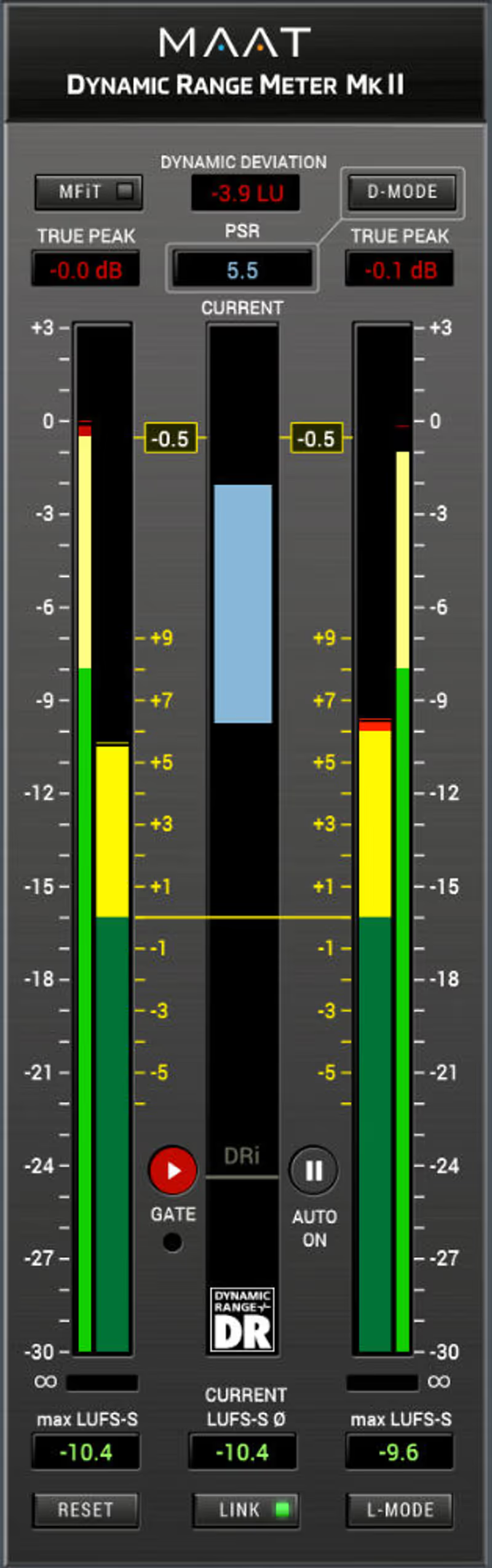
DRMeter MkII

7.0 / 10 Community score

Best for Dynamic Range

Scored from 5 user reports, not tested by us

How this score was reached

What users agree on. Valued as a quick and effective way to read the dynamic range of a mix or master, with engineers keeping lists of DR figures for reference records and using it to check a mix sits where its genre does.

The recurring complaint. Price draws consistent objections, with engineers openly questioning whether a professional would find it worth buying, and some describing the company as out of step with what people currently need.

Synthesised from 5 user reports (Gearspace and VI-Control threads around the DRMeter MkII release). Nobody here ran this product.

Useful if dynamic range is the thing you keep getting wrong, and hard to justify beyond that.

How it scored

  • Accuracy against standards 8.5

    Not disputed, and it measures a narrower thing.

  • Readability 8.0

    Quick to read, which is the point of it.

  • Breadth of tools Lowest in list 5.5

    Dynamic range focused rather than a delivery suite.

  • Value bought alone 6.0

    The most questioned price relative to what it covers.

Why we picked it

Composers who keep over-compressing and want a single number they can compare against reference recordings.

Who should skip it

You need delivery compliance metering, which this is not built to be.

The good

  • Fast, legible dynamic range readout
  • Good for reference comparison
  • Built for music, not only post
  • One number to compare against

The bad

  • Narrow feature set
  • Price widely questioned
  • Not a compliance meter
  • Developer reputation debated
Type
Dynamic range meter
Covers
Loudness and dynamic range
Price position
Mid
Why it scored that way · 1 min read One number, read quickly, compared against records you already know. Narrow on purpose.

One number, read quickly, compared against records you already know. Narrow on purpose.

The use case engineers describe for this one is specific and genuinely useful. It gives a quick, legible read on how much dynamic range a mix or master has left, and the workflow people report is keeping a list of DR figures for records they admire and checking whether their own material sits in the same territory as its genre. That is a real check that a LUFS meter does not perform.

It also attracts the sharpest price criticism on this page. Engineers question openly whether a working professional would find it worth buying at its price given how narrow it is, and some extend the criticism to the company, describing it as out of step with what people currently need. That is reputational rather than technical, and it is repeated often enough to report.

Where it fits is as a second meter rather than a first. If your recurring problem is arriving at delivery with the dynamics already spent, which is the most common mistake composers make on music for picture, this reads that directly and cheaply. If you have one purchase to make, the compliance question is the more urgent one and this does not answer it.

Check price $129
04 Youlean Best Free

Youlean Loudness Meter 2

8.6 / 10 Community score

Best for Loudness Delivery

Scored from 9 user reports, not tested by us

How this score was reached

What users agree on. Recommended as the first LUFS meter to install, with KVR reviewers calling it accurate and well designed and one ranking it among the two most accurate LUFS meters they had used. Users report running it on every master and for gain matching.

The recurring complaint. The free version shows Pro features as greyed-out buttons, which one reviewer called a big step down in usability, and the streaming presets are Pro only. Early versions had a true peak issue the developer acknowledged and fixed.

Synthesised from 9 user reports (KVR user reviews from 2016 to 2022, plus reviews and forum recommendations since). Nobody here ran this product.

The right first LUFS meter for almost everyone, and the Pro upgrade is cheap enough to buy when you want the streaming presets.

How it scored

  • Accuracy against standards 9.0

    Calibrated against the ITU test material, and reviewers rate it among the most accurate.

  • Readability 9.0

    Clear numbers plus a loudness history you can scroll.

  • Breadth of tools 6.5

    Loudness and dynamics only, which is the point.

  • Value bought alone Best in list 10.0

    Free, and the Pro tier is a small one-off payment.

Why we picked it

Composers who need to hit integrated LUFS and true peak targets for delivery or streaming and do not want to spend anything to do it.

Who should skip it

You need spectrum, imaging and surround analysis in the same window, or logged compliance reports for a broadcaster.

The good

  • Free version covers delivery basics
  • Reads to the ITU loudness standard
  • Film, TV and gaming presets free
  • Pro is a one-off payment

The bad

  • Streaming presets need Pro
  • Greyed-out Pro buttons in free
  • No spectrum or imaging
  • Not sold through our partner store
Type
LUFS meter
Covers
Loudness, LRA, dynamics, true peak
Price position
Free, Pro low
Why it scored that way · 1 min read The meter most engineers tell composers to install first. For many, it is also the last.

The meter most engineers tell composers to install first. For many, it is also the last.

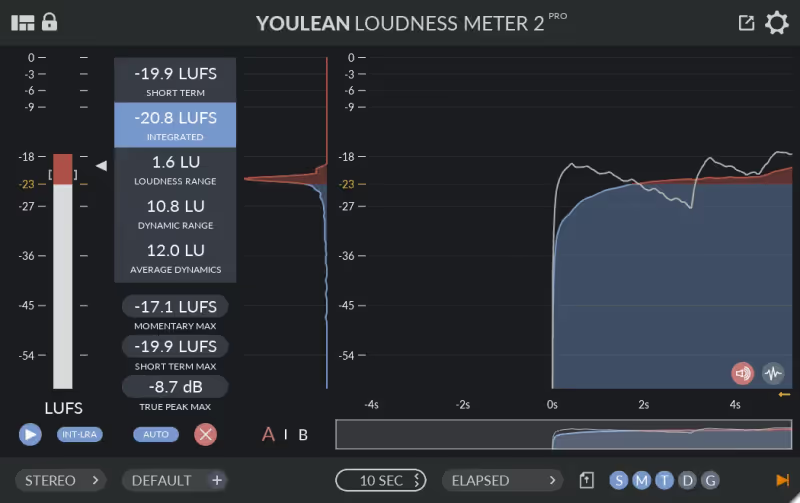
Youlean's meter is the answer most engineers give when a composer asks which loudness meter to use, and the reason is that the free version already reads the numbers a delivery spec asks for. Integrated, short-term and momentary loudness, loudness range, true peak and a dynamics readout are all there, with a scrolling history that shows where in a cue the loudness jumps. KVR reviewers call it accurate and well designed, and one ranks it among the two most accurate LUFS meters they have used.

The Pro upgrade, a one-off $49 that the developer often discounts, adds the streaming presets for Spotify, Apple Music and YouTube, a dynamics graph, PDF and image export of the loudness history and saved presets. The export is the feature worth paying for if you hand reports to a client or a music supervisor, since it puts the integrated figure and the history on one page.

The complaints are about the free version's interface rather than its measurements. Pro features appear as greyed-out buttons, which one reviewer found cluttered, and the streaming presets you probably want sit behind the upgrade. Gearnews also noted at launch that it had not compared the readings to other meters, which reviewers since have. None of that changes the advice: install this before you buy any other meter on this page.

Check price Free, Pro $49
05 NUGEN Audio

VisLM

7.5 / 10 Community score

Best for Broadcast Compliance

Scored from 7 user reports, not tested by us

How this score was reached

What users agree on. Treated as the professional standard in audio post, recommended by name when a delivery fails an R128 check, and ranked by engineers who have tried several meters among their favourites. NUGEN's loudness range is described as not the cheapest and almost certainly the best for compliance work.

The recurring complaint. Price is the standing objection, and engineers comparing it with Waves WLM note that WLM reads dialnorm where VisLM does not. At least one engineer moved away over platform support rather than the measurements.

Synthesised from 7 user reports (Gearspace post-production threads on loudness metering and compliance). Nobody here ran this product.

The right buy if you deliver to broadcast specs regularly, and more meter than most composers need.

How it scored

  • Accuracy against standards 9.0

    Trusted in the post-production threads where compliance matters.

  • Readability 8.0

    Functional rather than the most immediate display here.

  • Breadth of tools 7.5

    Focused on loudness and compliance rather than full analysis.

  • Value bought alone Lowest in list 5.5

    The most expensive meter here, and described as such repeatedly.

Why we picked it

Composers who deliver to broadcast compliance specs often enough that the paperwork matters as much as the music.

Who should skip it

Your delivery is occasional, where the price is hard to justify against a free meter.

The good

  • Trusted in professional post
  • Presets for broadcast standards
  • Timecode-locked loudness history
  • Part of a deep loudness range

The bad

  • Expensive for occasional use
  • No dialnorm reading
  • Narrower than Insight
  • Aimed at post, not composing
Type
Loudness and compliance meter
Covers
Loudness, true peak, history
Price position
Highest here
Price
Check site
Why it scored that way · 1 min read The meter that lives in audio post suites. Bought for compliance rather than for curiosity.

The meter that lives in audio post suites. Bought for compliance rather than for curiosity.

VisLM is the meter that comes up in the post-production forums rather than the music ones, and the framing there is compliance rather than curiosity. When an engineer reports a file flagged as too loud, the replies point to VisLM by name, and engineers who have tried several meters rank it among their favourites. NUGEN's loudness range as a whole is described as not the cheapest and almost certainly the best for this work.

It is worth being clear about the name. NUGEN also sells Visualizer, an analysis plugin that does not do R128 loudness metering, and one of the threads above is a user discovering exactly that. VisLM is the loudness meter, with true peak, presets for the broadcast standards and a loudness history that can lock to timecode from your DAW, so you can find the bar where a cue went over.

For a composer the question is whether you are in that situation. If cues go to a broadcaster with a specification attached and a rejection costs a day, the reputation this meter carries in post is worth paying for. If delivery is an occasional WAV attached to an email, it is a great deal of meter, and one engineer's note that Waves WLM reads dialnorm where VisLM does not is worth checking against your own deliverables.

What didn’t make the list

3 cut
  • WLM Plus Loudness Meter Waves

    Covers momentary, short-term, long-term and true peak readings to the ITU, EBU and ATSC specs, and it is often among the cheapest paid meters when Waves discounts. We found too few independent reports on it to score it fairly against the five above.

  • BUTE Loudness Analyser 2 Signum Audio

    A capable budget meter with streaming and broadcast presets, alerts for out-of-range sections and true peak overs, and an overview of up to ten hours of material, with a surround version up to 7.1.2. Well rated on the store we link to, but with little forum discussion behind it.

  • Pure Analyzer Flux

    Named in these threads by engineers who moved away from the options above, and it is a deeper analysis platform rather than a delivery meter. Worth knowing about if metering becomes a large part of your work.

What a LUFS meter reads

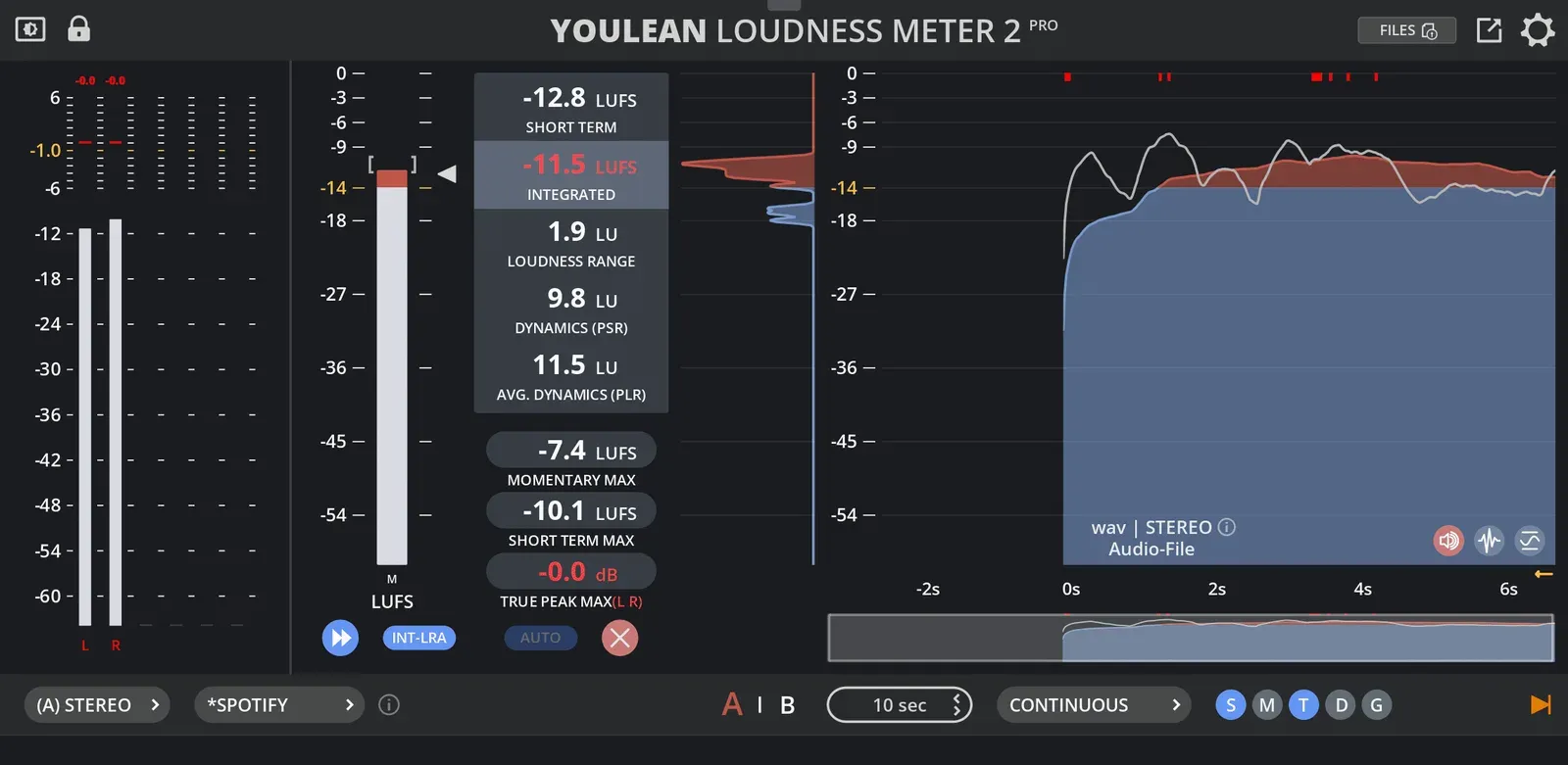
Youlean Loudness Meter 2 Pro reading a stereo file: short-term -12.8 LUFS, integrated -11.5 LUFS, loudness range 1.9 LU, true peak max -0.0 dB, with a loudness history graph against a -14 LUFS Spotify target.

Every LUFS meter shows some version of these readouts. Here the integrated figure sits 2.5 LU above Spotify’s -14 target and the true peak touches 0 dB, so this master would be turned down and could distort on conversion. Image: Youlean.

Integrated loudness is the number a delivery spec is written in: the loudness of the whole cue or track, measured from start to finish. Short-term (three seconds) and momentary (400 milliseconds) show where in the cue the loudness moves, which is what you watch while mixing. Loudness range, in LU, is how far the music travels between quiet and loud passages. True peak estimates the peaks that appear between samples after conversion, which a sample-peak meter misses, and specs cap it separately.

LUFS targets by platform

DestinationIntegrated targetTrue peak ceiling
European broadcast (EBU R128)-23 LUFS-1 dBTP
US broadcast (ATSC A/85)-24 LKFS-2 dBTP
Netflix-27 LKFS, dialogue-gated-2 dBTP
Spotify-14 LUFS (normalised)-1 dBTP
YouTube-14 LUFS (normalised)Not specified
Apple Music-16 LUFS (Sound Check)-1 dBTP

Broadcast, Netflix and Spotify publish these figures. YouTube and Apple Music do not document theirs, so those two rows are the levels engineers consistently measure. The spec you are handed always overrides all of them. Streaming services normalise rather than reject, so a master louder than the target is simply turned down, while a broadcaster or streamer commissioning picture can send it back. LKFS and LUFS are the same unit under two names.

For music written to picture, the cue is rarely delivered at the final programme loudness, because the dubbing mixer sets that. Ask what level they want stems at before you write, which is a question the guide to how loud a cue should be covers in more detail.

How to choose a LUFS meter

Start by installing a free meter, and do not skip this step because it sounds like advice for beginners.

Youlean’s free loudness meter answers the two questions a delivery spec actually asks, integrated LUFS and true peak, and it answers them accurately. Working with it for a month tells you what you are missing far better than any comparison table, and a substantial number of composers never need more.

The upgrade is justified by one of three things. You need breadth, meaning spectrum, imaging and surround readouts alongside loudness in one window, which is Insight. You need compliance, meaning presets and logging for specifications somebody else will check, which is VisLM. Or you release music to streaming and want loudness alongside plain-language checks of the master, which is LEVELS.

The thing worth measuring that most composers ignore is dynamic range. Hitting a LUFS target with three decibels of range left is a cue that technically complies and has nothing to give a dubbing mixer. That failure is invisible on a loudness meter alone, which is the argument for owning something that reads it.

Read more →

Methodology

Who is this for

Working composers and producers who need reliability, speed, and character for professional scoring tasks.

Our testing process

Where we have tested a product, we do it in actual production scenarios, ranging from rapid sketches to commercial pitches, and we evaluate it in a dense template rather than in isolation. Where we have not, the product card says so and the assessment is drawn from specifications and documented behaviour instead.

Why you should trust us

We buy most reviewed plugins ourselves. Occasionally we receive NFRs for evaluation, but this never guarantees a review or positive verdict. We may earn commissions from links, but our editorial choices are never for sale.

Also considered

For every category, we audition the top 8 to 15 standard options, discarding any that suffer from poor scripting, slow load times, or uninspiring sampling.

Frequently Asked Questions

What is a LUFS meter?

A LUFS meter measures loudness in Loudness Units relative to Full Scale, the unit defined by the ITU-R BS.1770 standard that broadcast specs and streaming services use. It weights the signal for how the ear hears and averages it over time, so it shows how loud a cue sounds rather than how high its peaks go. Most meters show integrated loudness for the whole piece, short-term over three seconds, momentary over 400 milliseconds, loudness range and true peak.

Do I need a LUFS meter if my DAW has meters?

Usually yes, because most channel meters show sample peak rather than loudness, and the two disagree. A cue can peak identically to another and measure several LUFS quieter, and the delivery spec is written in LUFS. Some DAWs now include a loudness meter, so check yours before buying anything.

Is a paid LUFS meter more accurate than a free one?

Not on the core measurement, since the standard is specified precisely enough that competent meters agree closely. What you pay for is breadth, workflow and compliance features such as several readouts at once, presets for specific delivery specs and logging. Start with a free meter and upgrade when its limits actually cost you time.

What LUFS should I master to?

The one the production or platform gives you. Broadcast in Europe works to -23 LUFS integrated under EBU R128 and US broadcast to -24 LKFS under ATSC A/85, while Spotify and YouTube normalise playback to around -14 LUFS. For music for picture with no spec given, around -23 LUFS with true peak under -2 dBTP is a safe default. Ask before you write rather than after you deliver.

How were these scores worked out if you did not test the plugins?

They are synthesised from Gearspace and VI-Control threads, KVR user reviews and magazine reviews, read for four recurring questions, and every card lists its sources and how many separate reports sit behind its score. The card also states plainly that nobody here ran the product. It is a different kind of evidence from a studio test and it is labelled as one.

Written By

Henry Foster

Henry is a mixing engineer with a background in broadcast and post-production. He obsesses over signal flow, gain staging, and the subtle coloration of analog-modeled plugins. His reviews focus on technical precision, CPU efficiency, and UI workflow.

Related Guides

All Guides →

New reviews, no noise

Occasional email when we publish something worth your time. No daily digest, no vendor press releases.

We store only your address, never sell it, and delete it as soon as you unsubscribe. See our privacy policy.