



Black Friday 2026260 deals tracked, up to 97% off See the deals →

5 Best Stereo Widener Plugins for Massive Mixes (2026)

If your mixes constantly sound small and incredibly narrow, you are completely failing to utilize the stereo field.

Henry Foster
By Henry Foster Mixing Engineer & Studio Tech

ModWheel is reader-supported. When you buy through links on this page we may earn an affiliate commission, at no extra cost to you. This never influences which products we recommend, read our testing methodology.

Prices come from the store's own feed and were last checked 23 November 2026. We don't issue discount codes — the price you see is the store's own.

Pick one in 10 seconds

Short version

Compare all 5

Stereoizer
1. Stereoizer Mastering Widener NUGEN Audio
7.9
Protection
iLok
$65 $129 View price
StageOne 2
2. StageOne 2 Acoustic Depth Leapwing Audio
7.8
Protection
Serial Key
$124 $249 View price
Ozone 12 Standard
3. Ozone 12 Standard Mastering Width iZotope
7.4
Protection
Native Access
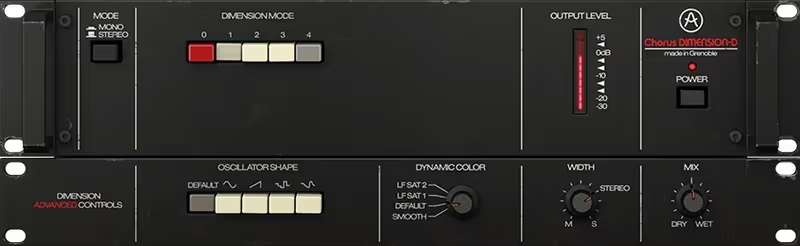
Chorus DIMENSION-D
4. Chorus DIMENSION-D Synth Width Arturia
7.3
Protection
Arturia Software Center
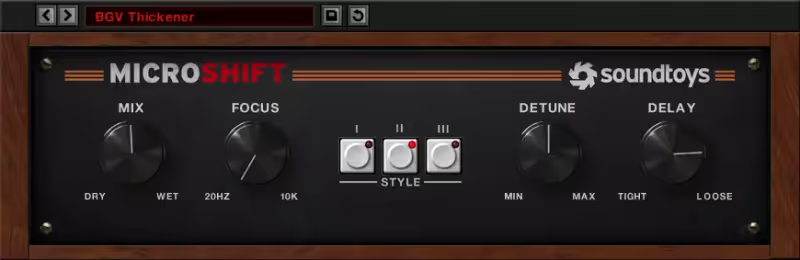
MicroShift
5. MicroShift Vocal Thickener Soundtoys
6.8
Protection
iLok
$39 $99 View price

Finding the best stereo widener plugins is absolutely mandatory for mix engineers who want to achieve professional, massively immersive track widths. Modern electronic music production relies heavily on creating incredibly wide, larger-than-life sounds that completely envelop the listener. The top stereo enhancement tools utilize highly complex psychoacoustic algorithms to instantly push audio out past the physical boundaries of your studio monitors.

You need a dedicated spatial processor that handles aggressive widening completely invisibly without causing catastrophic phase cancellation in mono. A fantastic stereo widener completely replaces the endless frustration of trying to manually duplicate and delay tracks to fake a massive stereo image. The right plugin depends heavily on your specific needs, such as preferring incredibly subtle mastering-grade expansion or highly aggressive, unnatural pitch-shifted modulation.

Top Picks

01 NUGEN Audio

Stereoizer

7.9 / 10 Score

Best for Mastering Widener

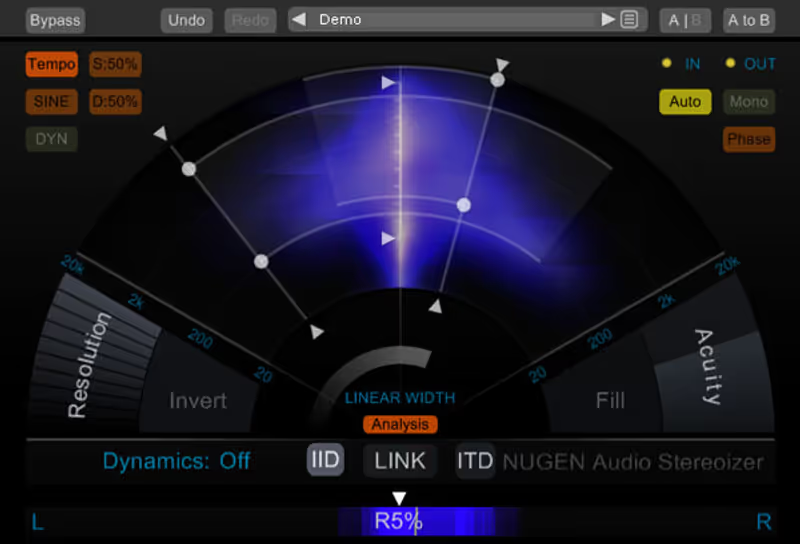
The only widener here that will not embarrass you on a mono fold-down, and it makes you read a phase meter to prove it.
How it scored

  • Mono Compatibility Best in list 9.6

    Psychoacoustic widening with a coherence display to check it. Best here.

  • Width Character 7.0

    Neutral. It widens without leaving a signature behind.

  • Workflow Speed 6.0

    Technical parameters that need understanding before they help.

  • Control Depth Best in list 9.0

    Multi-band control over where the width is applied.

Why we picked it

Best for mastering-grade widening because the advanced psychoacoustic algorithms perfectly deliver massive stereo enhancement while guaranteeing absolute mono compatibility.

Who should skip it

Avoid if you strictly want a highly colorful, aggressive vintage pitch-shifter that instantly imparts massive retro modulation without any technical parameter tweaking.

The good

  • Incredibly advanced mono-compatible widening algorithms
  • Fantastic visual phase coherence display
  • Excellent surgical multi-band parameter controls

The bad

  • Highly intimidating technical interface for beginners
  • Provides absolutely zero vintage analog coloration
  • Requires iLok account authorization
Format
VST/AU/AAX
Protection
iLok
Why it scored that way · 1 min read This processor provides genuinely strong surgical transparency by utilizing advanced psychoacoustic algorithms that never destroy mono compatibility.

This processor provides genuinely strong surgical transparency by utilizing advanced psychoacoustic algorithms that never destroy mono compatibility.

NUGEN Audio Stereoizer utilizes an incredibly complex multi-band architecture that allows you to instantly generate massive stereo width from a completely mono source flawlessly. The proprietary visual feedback display is absolutely phenomenal, allowing you to instantly identify dangerous phase cancellations before they completely ruin your mix on club systems. I heavily rely on this tool during mastering sessions because it instantly widens incredibly narrow electronic mixes without ever hollowing out the punchy center channel.

The incredibly dense interface and highly technical parameters can easily confuse beginners who just want a simple one-knob widening effect. Despite the steep initial learning curve, it is unquestionably the best mastering alternative for engineers who demand absolute, uncompromising mono compatibility. The incredibly pristine algorithms ensure your mixes instantly gain massive immersive width without any unwanted metallic artifacts or chorusing.
Used by
Top Tier Mastering Engineers Post Production Studios Broadcast Mixers
Lowest price we've recordedSince 23 Nov · 58 checks since 23 Aug Check price $65 (was $129)
02 Leapwing Audio

StageOne 2

7.8 / 10 Score

Best for Acoustic Depth

Depth rather than width, which is the more useful axis on an orchestral mix and the harder one to hear on a demo.

How it scored

  • Mono Compatibility 9.2

    Phase-coherent by design, with a centre gravity circuit holding the middle.

  • Width Character 7.5

    Subtle. It moves instruments back rather than pushing them out.

  • Workflow Speed 8.5

    Two main controls, both of which do something you can hear.

  • Control Depth 6.0

    Deliberately narrow. There is no aggressive setting to find.

Why we picked it

Best for transparent acoustic depth because the highly advanced phase-coherent algorithms perfectly expand the soundstage without adding unnatural metallic artifacts.

Who should skip it

Avoid if you specifically want highly aggressive, instantly noticeable robotic pitch-shifted widening for aggressive modern pop vocals.

The good

  • Incredibly pristine and transparent spatial expansion
  • Fantastic highly unique depth positioning control
  • Excellent phase-coherent center gravity algorithm

The bad

  • Lacks aggressive, unnatural pop widening capabilities
  • Very subtle effect may disappoint absolute beginners
  • Premium boutique price point
Format
VST/AU/AAX
Protection
Serial Key
Why it scored that way · 1 min read This incredibly pristine tool provides the absolute best, most immersive three-dimensional depth available for incredibly sophisticated acoustic mixing.

This incredibly pristine tool provides the absolute best, most immersive three-dimensional depth available for incredibly sophisticated acoustic mixing.

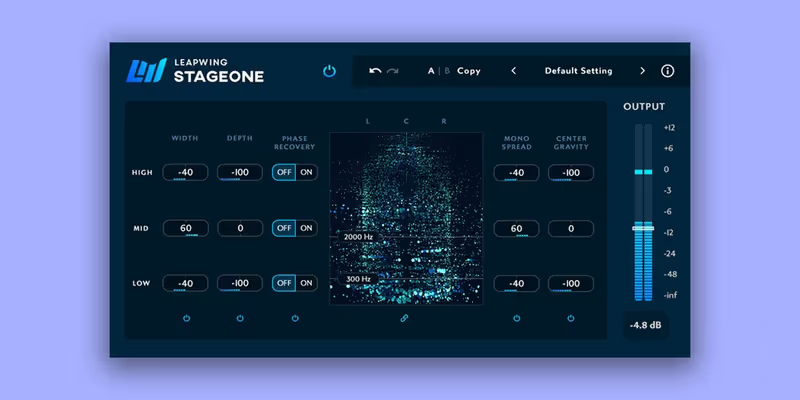
Leapwing Audio StageOne 2 provides an incredibly streamlined interface that focuses entirely on expanding the perceived depth and width of a mix using incredibly advanced phase-coherent algorithms. The highly unique depth control is absolutely fantastic, allowing you to smoothly push instruments further back into the virtual soundstage without completely ruining their fundamental volume balance. I frequently use the integrated center gravity circuit on dense orchestral recordings because it instantly solidifies the phantom center while spreading the reverberations out massively.

The intentionally subtle nature of the processing means you have absolutely no ability to generate aggressive, highly unnatural robotic widening effects. Even with this extreme lack of aggressive coloration, it remains an excellent choice for mastering engineers who want immediate, transparent acoustic expansion. The incredibly clean algorithms allow you to comfortably process an entire mix buss without introducing any noticeable artifacts.

Used by
Classical Engineers Jazz Mixers High-End Mastering Facilities
Lowest price we've recordedSince 10 Nov · 58 checks since 23 Aug Check price $124 (was $249)

Ozone 12 Standard

7.4 / 10 Assessed score

Best for Mastering Width

Not tested by us, assessed from specs and documented behaviour

Width as one stage of a mastering chain, which is the right buy if you finish your own stems and an expensive way to widen one synth.

How it scored

  • Mono Compatibility 8.5

    A Recover Sides mode aimed at the mono version, and a delta button to hear the change alone.

  • Width Character 7.0

    Pitched as natural width for narrow mixes, not an effect with a sound of its own.

  • Workflow Speed Lowest in list 5.5

    In Standard the Imager only runs inside the full Ozone plugin. Lowest here.

  • Control Depth 8.5

    Width set inside one chain with EQ, dynamic EQ, Bass Control and a maximizer.

Why we picked it

Best for composers who master their own cues or stems and want width decided inside the same chain as EQ and limiting.

Who should skip it

Avoid if the job is one narrow synth part, because Standard loads the whole mastering suite to reach the Imager.

The good

  • Stereoize and Recover Sides modes
  • Delta button on every module
  • Width judged inside the master chain

The bad

  • Imager is not a separate plugin
  • Whole suite loaded for one job
  • No VST2 build for older hosts
Format
VST3/AU/AAX
Protection
Native Access
Why it scored that way · 1 min read Width as one module of a full mastering chain, set against the EQ and limiter it will end up feeding. Stereoize handles narrow sources and Recover Sides is aimed at the mono version.

Width as one module of a full mastering chain, set against the EQ and limiter it will end up feeding. Stereoize handles narrow sources and Recover Sides is aimed at the mono version.

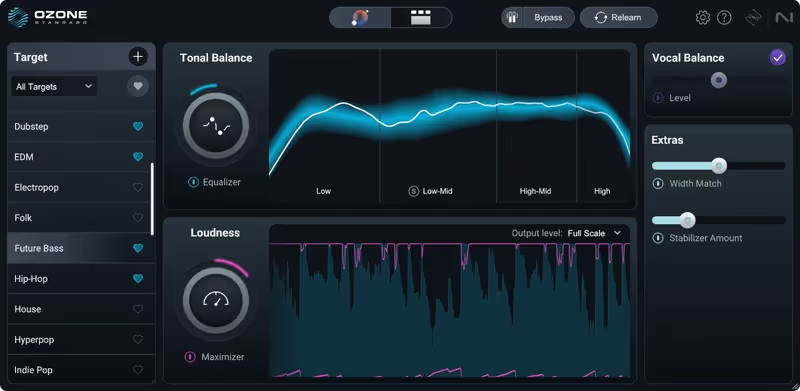
iZotope's Ozone 12 Standard is a mastering suite, and its Imager module is the part that belongs on this page. Imager offers a Stereoize mode for adding width to narrow material and a Recover Sides mode that iZotope describes as enhancing the mono signal, which is the version a broadcast fold-down will actually play. Every module in Standard carries a delta button, so the width being added can be heard on its own before it is committed to a stem.

The case for buying width this way is context. The Imager sits in one chain with the Equalizer, Dynamic EQ, Bass Control, Match EQ, Maximizer and Track Referencing, so a cue master or a stem delivery can be widened, balanced and limited against a reference in a single window, with the width judged against the rest of the master rather than in solo.

The cost is weight. In Standard the modules load only inside the Ozone plugin, because separate per-module plugins are reserved for Advanced, so widening a single synth bus means opening a full mastering suite on it. The plugin ships as AAX, AU and VST3 only, with no VST2 build for hosts that still depend on one.

Check price $219

Chorus DIMENSION-D

7.3 / 10 Assessed score

Best for Synth Width

Not tested by us, assessed from specs and documented behaviour

Four buttons from a mono part to a wide one, paid for with chorus colour and no low-end mono control to protect the fold-down.

How it scored

  • Mono Compatibility 6.0

    Width from modulated delay, with no low-frequency mono control to protect the fold-down.

  • Width Character 8.0

    BBD chorus with a compander stage, so the width always carries colour.

  • Workflow Speed 9.2

    Four mode buttons. Nothing has to be set up before it works.

  • Control Depth 6.0

    Five LFO shapes, Dynamic Colour, wet/dry and width past 100% sit behind the buttons.

Why we picked it

Best for composers who need a mono synth or keyboard part wide in seconds and want analog chorus colour with it.

Who should skip it

Avoid if the cue will be folded to mono for broadcast and you need width you can trust without checking it.

The good

  • Four buttons, width in seconds
  • Mono-to-stereo mode for dry parts
  • Width control runs past 100%

The bad

  • No low-frequency mono control at all
  • Chorus colour on everything it widens
  • Pitch movement audible on sustained sections
Format
VST/AU/AAX
Protection
Arturia Software Center
Why it scored that way · 1 min read Four buttons that turn a mono keyboard or synth part into a wide one with modulated delay. The width arrives with the colour of a bucket-brigade circuit attached.

Four buttons that turn a mono keyboard or synth part into a wide one with modulated delay. The width arrives with the colour of a bucket-brigade circuit attached.

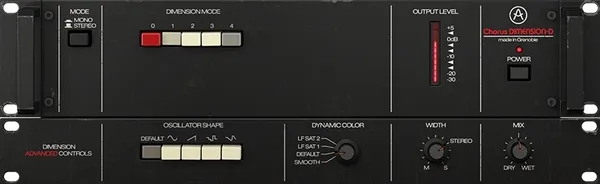
Arturia's Chorus DIMENSION-D models the Roland Dimension D, a late-1970s rack unit that engineers came to use less as a chorus than as a way to make a part sound broader and warmer. Operation is four buttons: modes 1 to 3 set fixed combinations of rate and depth, and mode 4 adds wet level on top of any of them. A plugin mode switch runs it mono, mono-to-stereo or full stereo, and mono-to-stereo is the setting that matters for a dry synth line or a single keyboard DI in a cue.

Behind the buttons sit controls the hardware never had: five LFO shapes, a Dynamic Colour control for the compressor and expander stage, a wet/dry mix, and a Width control that runs past 100 percent by changing the left and right levels. The width is built from modulated bucket-brigade delay with its own saturation and compression, so it is never neutral, and that colour is the reason to pick it over a mastering imager.

The feature list has no low-frequency mono control and no phase metering, so anything it widens has to be checked in mono before a stem goes out, ideally with kick and bass kept off it entirely. Chorus also means slow pitch modulation, which suits pads and keys far better than a string section that is meant to sound like players in a room.

Playing connects you to YouTube, which may set cookies.

Check price $99

MicroShift

6.8 / 10 Score

Best for Vocal Thickener

The most recognisable width on this page and the least safe, which is a poor trade on the one thing the page tests.

How it scored

  • Mono Compatibility Lowest in list 5.0

    Pitch-shifted doubling, and it thins when summed. Lowest here.

  • Width Character Best in list 9.4

    The pop vocal thickness people are actually asking for. Best on the page.

  • Workflow Speed Best in list 9.6

    Three buttons and a mix control. Best here.

  • Control Depth Lowest in list 3.0

    Detune and mix. There is nothing else to adjust. Lowest here.

Why we picked it

Best for immediate vocal widening because the authentic vintage pitch-shifting models perfectly provide massive, recognizable pop production thickness.

Who should skip it

Avoid if you absolutely demand highly pristine, perfectly transparent phase-coherent widening for your delicate classical cinematic scoring.

The good

  • Incredibly authentic vintage pitch-shifting modeling
  • Fantastic lightning-fast three-button interface
  • Excellent aggressive detune control capabilities

The bad

  • Lacks pristine transparent digital widening algorithms
  • Can easily cause phase issues if pushed too hard
  • Requires iLok account authorization
Format
VST/AU/AAX
Protection
iLok
Why it scored that way · 1 min read This highly focused plugin provides the absolute best, most immediate classic vocal widening available for modern pop production.

This highly focused plugin provides the absolute best, most immediate classic vocal widening available for modern pop production.

Soundtoys MicroShift perfectly captures the highly complex, incredibly musical pitch-shifting algorithms found in the massively expensive original hardware units. The incredibly simple three-button interface is absolutely fantastic, instantly allowing you to switch between completely different classic stereo widening flavors perfectly. I constantly rely on this plugin when processing narrow pop vocals because it instantly adds massive, thick stereo presence without sounding like an obvious, cheap chorus effect.

Because it focuses entirely on incredibly colorful, highly recognizable vintage pitch modulation, it completely lacks the perfectly clean, transparent algorithms required for delicate orchestral mastering. Regardless of this intentional lack of purity, it is the best alternative available when you need completely reliable, instant vocal width. The included detune knob allows you to easily push the massive stereo spread into highly aggressive, seasick detuning for creative sound design.

Used by
Top Tier Pop Producers Mix Engineers Vocal Editors
Lowest price we've recordedSince 19 Nov · 58 checks since 23 Aug Check price $39 (was $99)
Read more →

Methodology

Who is this for

Working composers and producers who need reliability, speed, and character for professional scoring tasks.

Our testing process

Where we have tested a product, we do it in actual production scenarios, ranging from rapid sketches to commercial pitches, and we evaluate it in a dense template rather than in isolation. Where we have not, the product card says so and the assessment is drawn from specifications and documented behaviour instead.

Why you should trust us

We buy most reviewed plugins ourselves. Occasionally we receive NFRs for evaluation, but this never guarantees a review or positive verdict. We may earn commissions from links, but our editorial choices are never for sale.

Also considered

For every category, we audition the top 8 to 15 standard options, discarding any that suffer from poor scripting, slow load times, or uninspiring sampling.

Frequently Asked Questions

How do I check whether my widening survives mono?

Sum the mix to mono and listen for what disappears. A widened element that drops in level or thins out is being partly cancelled, and the amount of drop tells you how much of that width was phase trickery. Do this before committing, because clubs, phone speakers and many broadcast paths sum without warning.

Why does a widened track get quieter in mono?

Because widening usually works by putting some content out of phase between the channels, and summing adds those opposite signals together to nothing. The wider it sounds in stereo, the more there is to lose. Techniques based on delay and pitch shifting behave better than pure phase inversion.

Should I widen the whole mix?

No. Widening the master pushes the centre elements outward as well, which weakens the vocal, the kick and the bass, and those are what hold a mix together. Widen individual elements that are meant to be large, keep the centre focused, and leave everything below about 120 hertz in mono.

What is mid-side processing and how does it widen?

Mid-side splits a stereo signal into what is common to both channels and what differs between them, so you can process each separately. Raising the side component or brightening it makes a track feel wider without touching the centre, which is more controllable than any dedicated widener and does not risk mono collapse in the same way.

Written By

Henry Foster

Henry is a mixing engineer with a background in broadcast and post-production. He obsesses over signal flow, gain staging, and the subtle coloration of analog-modeled plugins. His reviews focus on technical precision, CPU efficiency, and UI workflow.

Related Guides

All Guides →

New reviews, no noise

Occasional email when we publish something worth your time. No daily digest, no vendor press releases.

We store only your address, never sell it, and delete it as soon as you unsubscribe. See our privacy policy.