FabFilter · Review

FabFilter Pro-DS Review

Why the transparency that makes Pro-DS the default vocal de-esser is also the reason people set it wrong, and the one job it is not the right tool for.

Verdict

Buy it. It is the de-esser that stays out of the way, and the display teaches you what sibilance actually looks like, which is worth more than the processing on its own. The only reason to look elsewhere is if you want the de-esser to add character rather than remove a problem.

Playing connects you to YouTube, which may set cookies.

Production Expert's review of the Pro-DS de-esser. “FabFilter Pro DS Review” by Production Expert, on YouTube. Playing it loads the video from Google.

ModWheel is reader-supported. When you buy through links on this page we may earn an affiliate commission, at no extra cost to you. This never influences which products we recommend, read our testing methodology.

Pro-DS

Best for Vocal Mixing

The default choice for vocal de-essing, and transparent enough that you sometimes have to check it is working.

Score
8.9
out of 10

How it scored

  • Sound Quality 9.0

    Unmatched transparency, and it holds up on a full mix too.

  • Workflow Speed 8.5

    Fast once the threshold behaviour clicks.

  • CPU Footprint 8.8

    50 MB and light across many instances.

  • Metering & Control 9.2

    The visual feedback is what makes it teachable.

Why we picked it

Best for any vocal mixing situation because of its intelligent detection and transparent sound.

Who should skip it

Skip this if you want a vintage, colored sound. This is pure, clean utility.

The good

  • Unmatched transparency
  • Visual feedback is essential
  • Great on full mixes too

The bad

  • Expensive for a utility
  • Can be transparent to a fault
  • Requires learning the threshold
Engine
VST/AU/AAX
Type
Smart De-Esser
Size
50 MB
Price
$199
Why it scored that way

The most trusted de-esser in the industry.

My Experience:
FabFilter Pro-DS is the one plugin that is on every single vocal chain I build. Its accuracy is frightening. The "Single Vocal" detection algorithm is so smart that I rarely have to tweak the threshold for it to grab only the "S" sounds while leaving the breath and "air" of the vocal untouched. It effectively eliminates the risk of giving your singer a lisp, which is the biggest danger with cheaper units.

Deeper Look:
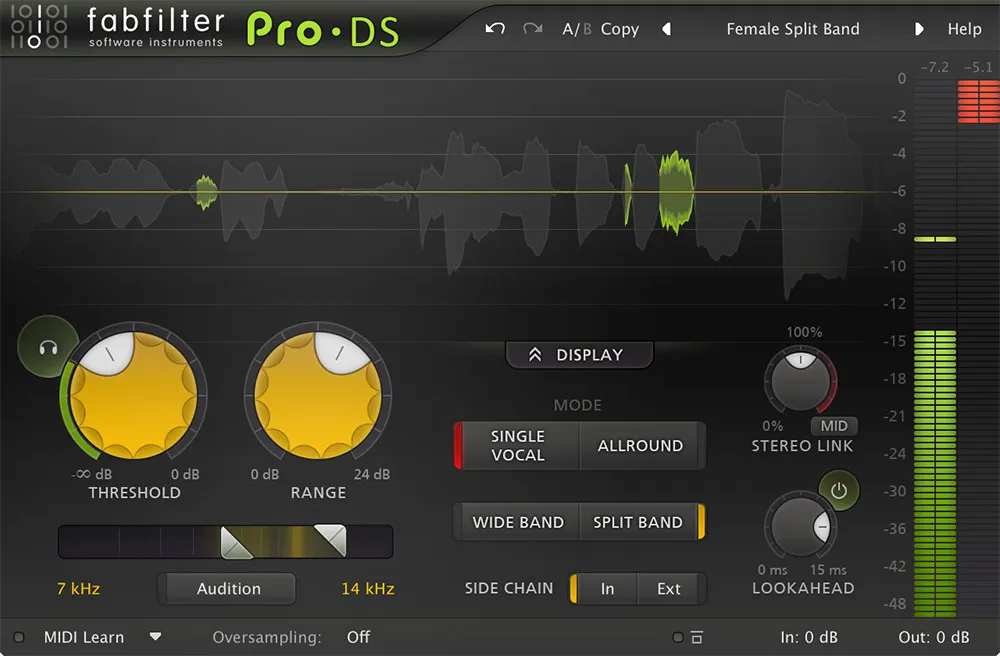
The visual feedback is, in typical FabFilter fashion, perfect. You see the waveform with the detected sibilance highlighted in green, so you know exactly what is being reduced. The "Allround" mode is also a secret weapon for mastering: I use it to tame harsh hi-hats or overly bright guitar solos without killing the track's excitement. Where it sits against the rest of this list: Pro-DS is the default recommendation here because it solves the problem most de-essers create. Single-band de-essers duck the whole signal when sibilance triggers, which dulls the vowel either side of the S. Pro-DS works on the sibilant band only, in a mode designed around detecting the sound rather than a fixed frequency, so the rest of the vocal is untouched. Its single-vocal and allround modes matter: the first assumes one voice and tracks it, the second is safer on a bus where multiple sources are present. If you only ever buy one de-esser, the argument for this over the specialists below is that it is hard to make it sound obviously processed.

Heard on
Top 40 Pop Vocals Dialogue Editing Mastering
Check price $199

Pro-DS has been the default recommendation for long enough that the interesting question is no longer whether it is good. It is why a utility plugin costs what a synth costs, and whether the transparency everyone praises is actually what you want.

What it does differently

Most de-essers ask you to find the offending frequency and set a threshold above which that band gets attenuated. Pro-DS asks for a threshold and works out the rest, tracking the sibilant content as it moves rather than treating it as a fixed band.

That matters because sibilance is not a fixed band. It moves with the vowel, the singer and the distance from the microphone, and a static crossover that sits correctly on one line sits slightly wrong on the next. Following it is the whole reason the result stays natural at reduction depths that would make a fixed-band processor obvious.

The display is the feature

The processing is excellent and the display is what makes it teachable. Seeing which syllables are triggering, by how much, and how the reduction tracks across a phrase turns de-essing from guesswork into something you can reason about — and it transfers. Once you have watched a few vocals through it, you know what sibilance looks like on any de-esser.

Plenty of plugins process well. Very few change how you hear the problem.

Transparent to a fault

The commonest way to get Pro-DS wrong is to over-apply it, and the reason is precisely its transparency: it does not complain. A more coloured de-esser tells you when you have gone too far by dulling the voice, which is annoying and also useful feedback. Pro-DS will happily take four or five decibels out of every ess without sounding broken, and what you lose is the consonant definition that made the words intelligible.

Set it by soloing the reduction, not by listening for damage. The damage is subtle by design.

It is not only for vocals

The single most under-used part of it is that it works on a full mix. A bright, sibilant master with no access to the stems is exactly the situation the frequency tracking suits, and it is far less destructive than the alternative of pulling the whole top end down.

Specs

TypeSmart de-esser, frequency-tracking
FormatsVST, AU, AAX
Size50 MB
CPULight, holds up across many instances

Who should buy it

Anyone who mixes vocals regularly. It is expensive for a utility and it is the utility you will open most often, which resolves the price question over about a month of work.

Anyone mixing occasionally can get most of the way with something cheaper — the de-esser roundup covers the field, and Waves Sibilance against Renaissance DeEsser is the same decision at a lower price point.

Skip it if you want the de-esser to contribute a sound. This one is built to leave nothing behind, which is a design goal rather than a limitation, but it does mean you are buying subtraction and nothing else.

Written By

Henry Foster

Henry is a mixing engineer with a background in broadcast and post-production. He obsesses over signal flow, gain staging, and the subtle coloration of analog-modeled plugins. His reviews focus on technical precision, CPU efficiency, and UI workflow.

Related Guides

All Guides →

New reviews, no noise

Occasional email when we publish something worth your time. No daily digest, no vendor press releases.

We store only your address, never sell it, and delete it as soon as you unsubscribe. See our privacy policy.